 luckpanda
Accounting Workflow Automation: How a Small Business Sets It Up, Step by Step
Accounting workflow automation uses rules to run reminders, ledger posting and payment events. Set up the first workflows and keep a person on sign-off.
On this page
- What does LuckPanda run for you today?
- What you need before you start
- How to automate your accounting workflows, step by step
- What should stay manual or need human approval?
- How do AI agents fit into accounting workflows safely?
- How do you measure whether automation saved time?
- Common errors and how to fix them
TL;DR: Accounting workflow automation means software runs a repeatable finance task when a trigger happens: an invoice falls due, a payment arrives, a document is issued. Start with payment reminders, automatic posting of invoices to the books and event webhooks, then add approvals and bank matching. LuckPanda runs the first three today, and its AI agents only draft: a person issues, sends and pays.
Want reminders and books that post themselves? Drafting in LuckPanda is free, and the Sales module costs $4.99 a month (₹199 in India), per module, not per user. Start free with LuckPanda.
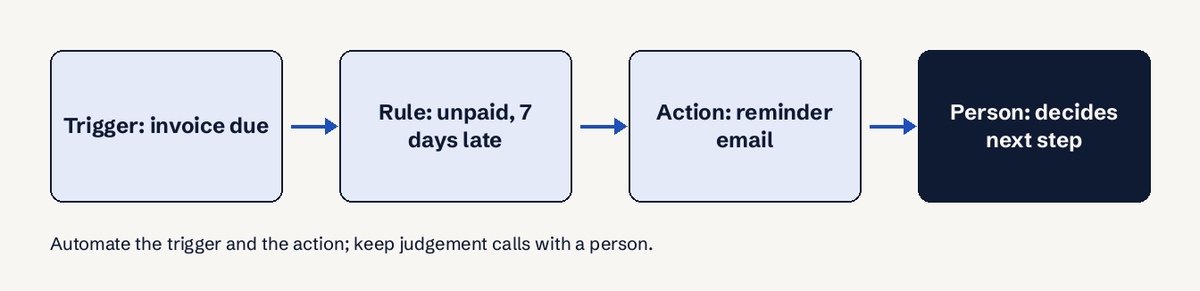
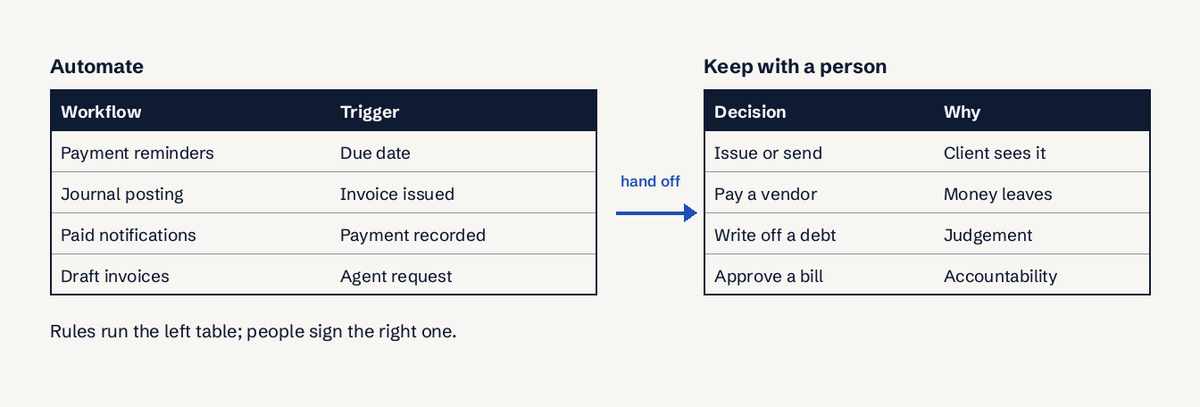
Accounting workflow automation is the use of rules in your accounting software so that a trigger (a due date, an issued invoice, a received payment) starts an action (an email, a journal entry, a notification) without someone doing it by hand. For a small business the first workflows to automate are the ones that repeat every week and follow fixed rules: chasing overdue invoices, posting sales to the ledger, telling other systems when an invoice is paid, and routing bills for sign-off. Judgement calls, such as writing off a debt, approving an unusual payment or issuing a document to a client, should stay with a person.
What does LuckPanda run for you today?
LuckPanda is a business operating system for small businesses where sales, purchasing, finance and compliance share one record of clients, items and money. Live today: payment reminders on issued invoices (Reminders), double-entry journal entries posted the moment an invoice or credit note is issued (Sales module), signed webhooks such as document.paid and payment.recorded (webhook examples), and AI agents that draft through the REST API or MCP server while issuing, sending and paying stay with a person (Workspace). Approval rules, bank reconciliation and recurring invoices are being built; the module pages say so, and the steps below show what to do meanwhile.
Automate first the workflows with a clear trigger, a fixed rule and a high count per month. Automate first the workflows with a clear trigger, a fixed rule and a high count per month. For most small businesses the order is:
| Workflow | Trigger | Automated in LuckPanda today | Time it removes |
|---|---|---|---|
| Overdue reminders | Due date | Yes, Sales | Writing and tracking chase emails |
| Posting sales to the ledger | Invoice or credit note issued | Yes, on issue | Re-typing invoices into books |
| Paid and payment events | Payment recorded | Yes, webhooks | Updating other systems by hand |
| Drafting documents | Agent or person request | Yes, agents draft | Filling repeat invoices |
| Recurring invoices | Schedule | Being built | Monthly retainer billing |
| Approval routing | Amount or type | Being built | Chasing sign-offs |
| Bank matching | Statement upload | Being built | Line-by-line matching |
What you need before you start
- One place where invoices, clients and payments live. Automation that spans three disconnected tools breaks at the joins.
- A written list of who may issue invoices, approve bills and pay vendors.
- Your country's record-keeping rules. In the US, the IRS says to keep most records for 3 years, employment tax records for at least 4 years and records for a bad debt deduction claim for 7 years (IRS). In the UK, HMRC's VAT Notice 700/22 requires that once data is in software, any further transfer between programs uses digital links, not copying by hand (HMRC VAT Notice 700/22). This is information, not tax advice.
How to automate your accounting workflows, step by step
- Map 7 days of finance work. Write down every task, how often it happens and whether it follows a fixed rule. "Email clients whose invoice is 7 days overdue" is a rule. "Decide whether to give this client more credit" is a judgement.
- Automate payment reminders first. In LuckPanda, issue the invoice, then set its reminder schedule. Exact setting: reminders at -3, 0 and +7 days from the due date (the default). Turn them off for a client you are speaking to directly.
- Let issuing post the books. Issue sales documents from the same system that keeps the ledger, so each invoice and credit note posts its journal entries at the moment of issue. Exact setting: none; it happens on issue, in the app and through the API alike. Fix mistakes with a credit note, never by editing.
- Send events to the systems that need them. Create a webhook endpoint for document.paid so your shop or order system marks the order paid. Exact setting: subscribe to document.paid and payment.recorded, verify the LuckPanda-Signature header (HMAC-SHA256), reject a timestamp more than 5 minutes old, answer 2xx within 10 seconds and skip event ids you have already seen. A business can have at most 10 endpoints.
- Put an agent on drafting, not on deciding. Create an agent key in Workspace, Developers, and connect your AI assistant to the account MCP server at https://luckpanda.app/mcp. Ask it to draft this month's retainer invoices from last month's, for example 12 invoices at $1,200 each in USD. Exact rule: the agent's drafts wait until a person reviews and issues them.
- Write down your approval rule now, enforce it in software later. Until LuckPanda's approval rules ship, use a written rule, for example "bills above ₹50,000 need the owner's sign-off", and have the person who pays check it. When approvals go live they will set rules by document type and amount and record who approved, when and why (Approvals).
- Reconcile weekly by hand, with the books already posted. Because invoices and recorded payments already post entries, the weekly bank check is matching lines, not typing them in: set a fixed 30 minute slot each week and adjust it after 4 weeks. Reconciliation that suggests matches for a person to accept is being built.
What should stay manual or need human approval?
Anything that commits money, reaches a client or changes what the books say happened should need a person: issuing or sending a document, creating a payment link, paying a vendor, writing off a debt and approving a bill above your limit. LuckPanda builds this in: agent keys are refused for issuing, sending, payment links and recording payments, and an approval can only be decided by a person. Automation can prepare all of these. It should not be the one that says yes.
How do AI agents fit into accounting workflows safely?
AI agents fit as drafters. IBM lists hallucination among the risks of AI in accounting (IBM), so an agent's output should be a proposal a person accepts. Three controls make that safe in practice:
- Same permissions as people. In LuckPanda an agent key calls the same commands as the app, with the same permission checks.
- No duplicate work on retries. Every agent mutation carries an idempotency key, so a retried request does not create a second invoice.
- A record of who did what. Every change is recorded with the agent as its author, so you can see what the agent drafted and who issued it.
The open Model Context Protocol (MCP specification) is how assistants such as Claude or ChatGPT connect to tools; LuckPanda's agent page lists the setup for each.
How do you measure whether automation saved time?
Measure before and after for four weeks, on numbers you already have:
- Days sales outstanding: average days from invoice to payment. If it was 45 days before reminders, check it again after 30 days.
- Hours on finance admin per week: log them for 7 days before and 7 days after, in 15 minute blocks.
- Corrections: count credit notes and reversals caused by typing errors.
- Late sign-offs: bills paid late because nobody approved them.
If a workflow does not move one of these numbers after a month, it was not worth automating; switch it off.
Common errors and how to fix them
- Reminders going to a client who already paid. The payment was not recorded on the invoice. Record each payment as it arrives; LuckPanda stops reminders once the invoice is fully paid, and on part payment shows the amount still due.
- Webhook processed twice. Your endpoint did not check the event id. Store ids and skip repeats; failed deliveries are retried after 1 min, 5 min, 30 min, 1 h, 3 h, 6 h and 12 h, 8 attempts in all.
- "Edited" invoice that no longer matches the books. Issued invoices cannot be edited in LuckPanda by design; issue a credit note instead.
- Agent request refused. The agent tried to issue, send or record a payment. That is expected: review the draft and issue it yourself.
Questions
What is accounting workflow automation?
It is the use of rules in accounting software so that a trigger, such as a due date or an issued invoice, runs an action, such as a reminder email or a journal entry, without manual work.
Which accounting processes should a small business automate first?
Payment reminders, posting invoices to the ledger and payment notifications to other systems. They repeat often and follow fixed rules.
Can an AI agent approve or pay bills?
Not in LuckPanda. Agents can draft and revise; issuing, sending, payment links, recording payments and approvals stay with people.
Is accounting automation expensive for a small business?
In LuckPanda drafting is free; each module costs $4.99 a month (₹199 in India), per module and not per user, with 30% off the full suite (₹1,393 a month for all 10 modules) and 25% off annual billing (₹1,791 a year per module) (pricing).
Does automation replace an accountant?
No. It removes data entry and chasing; review, judgement and tax advice still need a person.
Ready to stop chasing invoices by hand? Create your first invoice free in LuckPanda and add reminders when you issue it.