 luckpanda
Document Approval Workflow: 5 Copyable Templates and 12 Tools Worth Using
A document approval workflow routes a draft to the right approvers, records each decision and releases it only when approved. Five copyable templates and 12 tools.
On this page
- What are the steps of a document approval workflow?
- 5 copyable templates for quotes, invoices, POs, contracts and expenses
- 1. Quote approval template
- 2. Invoice approval template
- 3. Purchase order approval template
- 4. Contract approval template
- 5. Expense claim approval template
- How many approvers should a document need?
- What should an approval audit trail record?
- How LuckPanda handles approvals today
- 12 document approval tools and references
- Workflow tools with ready templates
- Rules and standards
- Templates for business documents
- Start here
TL;DR: A document approval workflow is the fixed path a draft takes from the person who wrote it to the people who must sign off, with a time limit at each step and a record of every decision. Below are five copyable templates (quotes, invoices, purchase orders, contracts and expense claims), each with steps, approvers, an SLA and the audit-trail fields to keep, plus 12 tools and references to run them. In LuckPanda, agents and teammates draft documents and only a person can issue or send them; approval rules by document and amount are being built in the Workspace module.
Draft quotes, invoices and purchase orders free, and issue them only when a person decides. See the LuckPanda Workspace module.
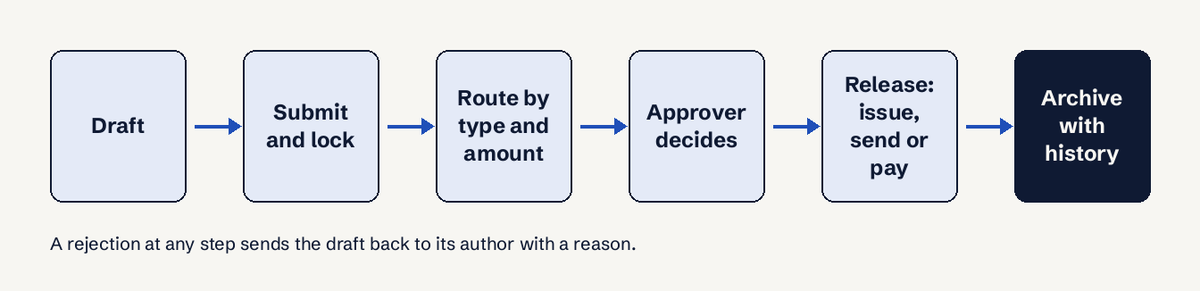
A document approval workflow answers four questions for every document: who can submit it, who must approve it (and in what order), how long each approver has, and what gets recorded. The usual steps are: draft, submit, route by rule (document type and amount), review, approve or reject with a reason, release (issue, send, sign or pay), and archive with the full history. Most small businesses need one or two approvers per document; a second approver is worth adding only above an amount you set, so routine documents do not wait.
What are the steps of a document approval workflow?
A document approval workflow has seven steps, whatever tool runs it:
- Draft. The author (a person or an AI agent) prepares the document. A draft has no number and cannot leave the business.
- Submit. The author marks it ready. The document is locked against edits while it is in review.
- Route. A rule picks the approvers from the document type and amount, for example "quotes over ₹5,00,000 go to the owner".
- Review. Each approver sees the document and the reason it reached them, with a due time, typically 4 to 24 hours.
- Decide. Approve, or reject with a written reason. A rejection returns the draft to the author.
- Release. Only after the last required approval is the document issued, numbered, sent, signed or paid.
- Archive. The document is stored with every decision, who made it and when.
How do you create one? To create a document approval workflow, list the documents that leave the business or commit money, set the amount above which a second person must look, name each approver by role with a backup for leave, and give each step an SLA with an escalation when it lapses.
5 copyable templates for quotes, invoices, POs, contracts and expenses
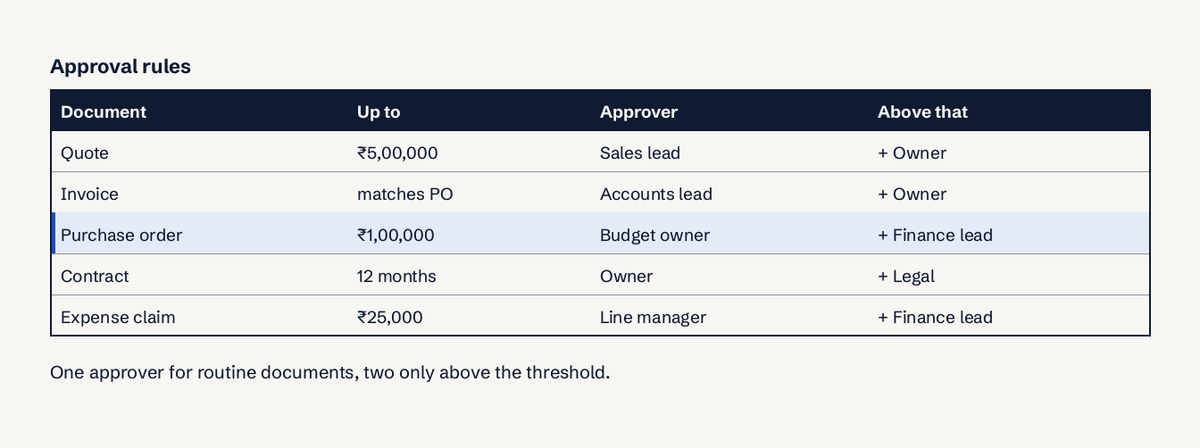
Each template below is tool-neutral: copy the rows into a spreadsheet, Jira, Power Automate or your own app through its API. Amounts are examples; set your own.
| Document | Who drafts | Approver | When a second approver is needed | SLA per step | Released by |
|---|---|---|---|---|---|
| Quote | Sales or an agent | Sales lead | Discount over 15% or total over ₹5,00,000 ($6,000): owner | 4 hours, then remind | Sales lead sends |
| Invoice | Accounts or an agent | Accounts lead | Total differs from the quote or PO: owner | 24 hours, then escalate | Accounts lead issues |
| Purchase order | Requester | Budget owner | Over ₹1,00,000 ($1,200) or a new vendor: finance lead | 24 hours, then escalate | Purchasing issues |
| Contract | Owner of the deal | Legal or the owner | Term over 12 months or auto-renewal: owner signs | 3 days, then owner | Signatory signs |
| Expense claim | Employee | Line manager | Over ₹25,000 ($300) or no receipt: finance lead | 2 days, then finance | Finance pays |
1. Quote approval template
- Trigger: a quote is marked ready.
- Rule: discount above 15% (or 10% on repeat clients) or total above the threshold adds the owner.
- Approver checks: price list used, discount reason written, payment terms, validity date, tax lines for the buyer's country.
- Rejection reasons to offer: price below floor, wrong tax, terms not standard.
2. Invoice approval template
- Trigger: an invoice draft is created from a quote, sales order or delivery.
- Rule: if the total or the items differ from the quote or PO, the owner approves.
- Approver checks: buyer details, tax ID, place of supply, due date, bank details unchanged.
- For the full checklist, see the invoice approval process guide.
3. Purchase order approval template
- Trigger: a requisition becomes a PO draft.
- Rule: amount above the threshold or a vendor not yet approved adds the finance lead.
- Approver checks: budget line (no more than 100% of the remaining budget), three quotes where your policy asks for them, delivery date.
- More detail: the PO approval workflow guide and the purchase requisition guide.
4. Contract approval template
- Trigger: a final draft is uploaded.
- Rule: term over 12 months, auto-renewal, unlimited liability or exclusivity adds legal or the owner.
- Approver checks: parties, term, renewal, liability cap, termination notice, governing law.
- SLA: 3 days for review, 1 day for signature.
- Release: the authorised signatory signs; the signed copy replaces the draft in the record.
5. Expense claim approval template
- Trigger: an employee submits a claim with receipts.
- Rule: above the threshold or missing a receipt adds the finance lead.
- Approver checks: business purpose, policy limit, receipt dated within 30 days, no duplicate claim.
- Release: finance pays and records the payment.
How many approvers should a document need?
One approver for routine documents, two above a threshold, and rarely more. Every added approver adds waiting time to every document they see, so a second approver should exist only where the risk is real: large amounts, new vendors, unusual discounts or long contracts. Keep the author from approving their own document (segregation of duties), and write the limits per role in a delegated authority matrix so the rule outlives any one employee.
Tools differ in how they combine approvers. Microsoft Power Automate offers "Everyone must approve" (the flow continues after all respond, or at the first rejection), "First to respond", custom responses, and sequential approval, where each approver must respond before the next one gets the request (Microsoft Learn, read 2026-11-22). Use parallel "everyone" approval for independent checks (legal and finance on a contract) and sequential approval when the second approver needs the first one's decision.
What should an approval audit trail record?
An approval audit trail should record, for every step: the document and its version, who acted, the action (submitted, approved, rejected, edited, released), the date and time, the reason for a rejection, and the rule that sent it to that person. The standard most teams borrow is the US FDA's 21 CFR 11.10(e): audit trails must be "secure, computer-generated, time-stamped", record actions that create, modify or delete records, must not obscure earlier entries, and are kept as long as the record itself (eCFR). Section 11.10(f) adds system checks that enforce the permitted order of steps, which is exactly what stops a document being released before it is approved.
| Field | Example |
|---|---|
| Document and version | PO-0142, version 2 |
| Actor | Finance lead (Ravi M.) |
| Actor type | Person or agent key |
| Action | Rejected |
| Reason | Vendor not on approved list |
| Rule that routed it | PO over ₹1,00,000 |
| Timestamp | 2026-11-22 14:05 IST |
Recording the actor type matters once AI agents draft documents: you want to see that an agent prepared the PO and a person approved it.
How LuckPanda handles approvals today
LuckPanda is a business operating system for small businesses where sales, purchasing, finance and the rest share one record. For approvals, here is what is live and what is not, as of 2026-11-22:
- Live: agents draft, people decide. API and MCP agent keys call the same commands as the app, with the same permission checks. Agent keys can create and revise drafts; issuing, sending, payment links and recording payments are refused for agents and need a person (Workspace module).
- Being built: approval rules by document type and amount, a queue for each approver showing what waits for them, and a record of who approved or rejected, when and why. The same rules will apply to work drafted by agents, and agents cannot approve (Approvals page).
- Price: $4.99 per module per month, ₹199 for a business in India, per module and not per user (pricing).
Until approval rules are live, use the templates above as your written policy and keep the "only a person issues" rule that LuckPanda already enforces.
12 document approval tools and references
Workflow tools with ready templates
- Microsoft Power Automate approvals: for Microsoft 365 teams; four approval types plus sequential; needs a Dataverse database the first time.
- Power Automate approval how-to: custom responses, such as letting an approver pick a discount level instead of yes or no.
- Jira document approval template: free template with board, timeline, forms, workflows and automations; suited to legal and policy documents.
- Zapier document approval template: an upload form, an approvals table and one Zap that emails the approver and notifies the requester; connects to 6,000+ apps.
- Jotform document approval process template: upload form, email, manager approve and sign, and an approval report; good when approvers work from email.
- Adobe Workfront approval templates: up to 30 parallel paths and 100 stages, workdays until due per stage; for creative and marketing assets.
- ServiceNow document approval template: for companies already on ServiceNow App Engine.
- Autodesk Docs approval workflows: review workflows for drawings and construction documents.
- HighQ file approval templates: file approval for legal teams on Thomson Reuters HighQ.
Rules and standards
- 21 CFR 11.10, eCFR: the audit-trail and step-order controls most approval systems copy.
- Workfront approval stages: how a single "only one decision required" stage differs from a stage that needs everyone.
Templates for business documents
- LuckPanda Workspace module: draft documents free; only a person issues or sends.
Start here
If you have no written process yet: copy the five-row template table, set your own thresholds, name a backup approver for each role, and run it in the tool your team already opens every day. Add a second approver only where a real loss has happened or could.
Keep drafts free and let only a person issue. Start with LuckPanda Workspace.
Questions
What is a document approval workflow?
A document approval workflow is a fixed sequence of steps that a document passes through before it is released: draft, submit, route to approvers, decide, release and archive, with each decision recorded.
What is the difference between sequential and parallel approval?
In sequential approval each approver must respond before the next receives the request. In parallel approval all approvers receive it at once; with "everyone must approve" the request completes when all approve, and one rejection stops it.
How many approvers should a document need?
One for routine documents and two above an amount or risk threshold you set. More approvers slow every document they touch without adding much control.
What should an approval audit trail record?
The document and version, who acted, whether a person or an agent, the action, the timestamp, the rejection reason and the rule that routed it. Entries should never overwrite earlier ones.
Can an AI agent approve a document?
It should not. In LuckPanda agent keys can draft and revise but cannot issue, send or pay, and planned approvals are decided only by people.