 luckpanda
Live Chat Best Practices: 12 Rules for People and AI Bots
Live chat best practices: be easy to find, reply fast with a real answer, say when it's a bot, hand off without repeats, and read every transcript.
On this page
- Why do live chat best practices matter?
- What you need before you start
- How to run live chat well: 12 steps
- Who does what: a person, an AI bot, or both?
- What response time should live chat aim for?
- When should a chatbot hand a chat to a person?
- Is bot disclosure a legal requirement?
- Should you use canned responses?
- What should you do with chat transcripts?
- How to check it is working
- Common live chat mistakes
TL;DR: Good live chat is easy to find, answers fast with a specific answer, says plainly when a bot is talking, hands hard chats to a person without making the visitor repeat themselves, and treats every transcript as data. The rules are the same whether a person or an AI bot answers; only who does what changes.
The live chat best practices that matter most are: put chat where people look for it (Contact page, product pages, a bottom-right button), give an honest wait time, answer with specifics instead of a canned line, disclose bots, ask for contact details only when the visitor wants something, hand off with full context, show your hours, keep the transcript, and review chats every week for the questions and doubts your pages don't answer. Usability research from Nielsen Norman Group (8 participants contacting real businesses by chat) backs most of these with direct user observation, and since 2 August 2026 the EU AI Act makes bot disclosure a legal duty for AI chat in the EU.
Why do live chat best practices matter?
Live chat best practices matter because chat is the one channel where a visitor watches you work in real time. In NN/g's usability study of customer-service chat, participants read a hard-to-find chat as "it's pretty clear that they don't want you to contact them", treated long waits as a sign the company was understaffed, and grew suspicious of generic replies. A slow or vague chat costs more than no chat: the visitor came with a question your page did not answer and leaves with a worse impression.
The second reason is sales. A large share of chats start on pricing and product pages from people deciding whether to buy. Treating those chats as support tickets to close fast wastes the moment.
What you need before you start
- A list of the 20 questions people ask most (pricing, delivery time, return window, payment methods, hours), from email, calls and existing chats.
- Written answers for pricing, delivery, returns and hours, published on your site. Publish a 30 days or 14 days return window as a number, not "a short period". A bot can only answer from what exists, and a person answers faster from it too.
- Who covers chat and when. Write the hours down.
- A place for leads to go (a CRM or at least a shared inbox).
How to run live chat well: 12 steps
- Put chat where people look for it. Add a link labelled "Chat" on the Contact page, a link on product and pricing pages, and a floating button in the bottom-right corner that contrasts with the page. NN/g found people often ignore floating buttons, so the button alone is not enough.
- Label it plainly. "Chat with us" beats "Ask a question" or "Need help?". Setting: button label = "Chat".
- Show your hours or an honest wait. If people answer only during business hours, say so in the widget ("We reply 9:00 to 18:00 IST, Monday to Saturday"). While a visitor waits, give a time estimate, not "You are number 5 in the queue".
- Open with a real question. NN/g observed a user delete her typed question to answer "How are you?". Use "Hi! What can I help you with?" and let them type.
- Answer with specifics. If someone asks about returns, give the window, who pays shipping and the first step, not "all the information is in our policy". A canned answer is fine when it is complete and instant: NN/g's participant called a 2-minute wait for a copy-paste return policy too long when it could be pasted in 10 s.
- Say when it's a bot. State it in the first message ("I'm an AI assistant for Acme; a person can take over"). People phrase questions more efficiently when they know, and the law now requires it in several places (see below).
- Ask at most two or three questions. To recommend the right plan or product, you need the need, the size and the timeline. Ask those, then suggest one next step. More questions feel like a form.
- Ask for contact details only when the visitor wants something. A quote, a call back, a demo, a reply after hours. Asking for an email before answering the first question loses the people who only wanted an answer.
- Hand off with context. When a bot cannot answer, it should say so, offer a person, and pass the whole transcript. The visitor must never retype the question: NN/g lists this as a top annoyance.
- Keep people updated in long chats. "Still checking that with the warehouse" stops the visitor wondering if you left. Avoid system messages like "session expired" while a person is still working on the answer.
- Offer the transcript. Email it at the end without asking again for an email you already have. Visitors use it as a record, especially in disputes.
- Review chats every week. Read the questions you could not answer, the doubts that stopped a purchase and the things people asked for that you don't offer. Fix the page, write the answer, or add it to the roadmap.
Who does what: a person, an AI bot, or both?
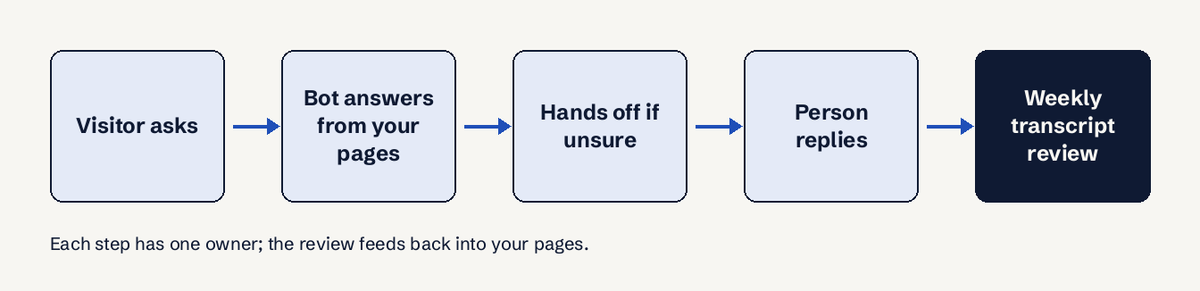
Most small businesses now run both: a bot answers instantly at any hour and a person takes the chats that need judgement.
| Practice | AI bot | Person |
|---|---|---|
| First reply speed | Seconds, 24/7 | Minutes, within hours |
| Answers from your pages | Yes, if the page exists | Yes |
| Prices and exceptions not on the site | Must not guess; hand off | Decides |
| Angry or complex chats | Hand off | Owns |
| Disclosure | Must say it is AI | Name and role |
| Weekly review | Groups requests | Reads and acts |
The rule that ties it together: a bot answers only from what you wrote, and says "I don't know, let me get a person" when the answer is missing. A bot that guesses a price or a policy creates a promise you have to honour or retract.
What response time should live chat aim for?
Aim for a first reply within 60 seconds during the hours you advertise, and an instant reply for anything a canned answer or a bot can handle. NN/g's participants felt even a 1 minute wait was long when staring at a phone screen, and mobile users can't easily multitask while they wait. Outside your hours, don't fake availability: say when a person will reply (for example "within 12 hours") and collect a contact only if they want that reply.
Track it as first response time (FRT) and look at the slowest 10% of chats (the 90th percentile), not only the average: an average of 40 seconds can hide 1 chat in 10 waiting over 5 minutes. Our guide to live chat metrics covers which numbers to watch.
When should a chatbot hand a chat to a person?
A chatbot should hand a chat to a person when the answer is not in its content, when the visitor asks for a person, when money or an exception is involved (a discount, a refund outside policy, a custom quote), and when the visitor is upset. Make the handoff visible within 30 seconds ("A person from our team will reply here"), keep the bot quiet while the person has the chat, and hand back when it is resolved.
Is bot disclosure a legal requirement?
Yes, in more places every year. Article 50(1) of the EU AI Act requires that people are told they are interacting with an AI system unless it is obvious, and Article 50(5) says this must happen at the latest at the first interaction; the obligation applies from 2 August 2026. In California, Business and Professions Code section 17941 (SB 1001) has since 1 July 2019 made it unlawful to use a bot to mislead someone about its artificial identity to encourage a sale, unless the bot is disclosed clearly. One line in the greeting covers both. This is information, not legal advice.
Accessibility matters too: WCAG 2.2 success criterion 2.2.1 (Timing Adjustable), a Level A requirement, treats an automatic session timeout as a time limit, so a chat that closes after inactivity should warn the user, give at least 20 seconds to extend with one action, and allow at least 10 extensions (or let them adjust the limit to 10 times the default).
Should you use canned responses?
Use canned responses for common, complete answers (hours, delivery times, return steps), personalise the first line, and never send one that does not answer the question asked. Too many generic lines make people think they are talking to an unannounced bot. Our free canned responses library has ready answers you can edit, and the empathy statements library helps for hard chats.
What should you do with chat transcripts?
Treat transcripts as the most honest buyer research you have: visitors type their real doubts in their own words. Once a week (30 minutes is enough under 100 chats), tag chats by what they asked, what stopped them and what they wanted that you don't offer, then fix the top three. Our guide on turning chats into voice-of-customer data walks through it, and customer feedback categories gives a tagging scheme.
How to check it is working
- Open your site on a phone, find chat from the Contact page and a product page, and ask your top three questions. Time the replies: anything over 60 s during your hours is a miss.
- Ask something your site does not answer. The bot should say so and offer a person.
- Ask for a person and check the handoff arrives with the full transcript.
- Close the chat and check the transcript email arrives within 5 minutes.
Common live chat mistakes
- "Online" when nobody is there. Fix: show real hours, or let a bot answer and say when a person replies.
- Email gate before the first answer. Fix: answer first, ask for contact only when needed.
- The bot guesses prices. Fix: answer only from your published content; hand off the rest.
- Repeat-your-question handoffs. Fix: pass the transcript to the person.
- Transcripts nobody reads. Fix: a 30-minute weekly review with three actions.
If you want a bot that already follows these rules, LuckPanda Chatbot builds one from your website's pages, answers only from your content, asks at most two or three questions, hands chats to you when it can't help and groups what visitors asked for on a Requests board. You can try a preview without an account; putting it live costs $4.99 a month for up to 10 websites.
Questions
What is live chat etiquette?
Live chat etiquette is the set of manners that make a chat feel helpful: greet briefly and ask how you can help, use the visitor's words, answer specifically, tell them when you need time, don't use jargon, and close by confirming the question is solved. Avoid "How are you?" openers and walls of canned text.
How many chats can one person handle at once?
It depends on the complexity of the chats. Simple pre-sales questions allow 3 or 4 at once, while troubleshooting or complaints need one at a time. If first reply times climb above your target, the person is handling too many.
Should live chat be available 24/7?
Only if someone or something can actually answer at night. A bot that answers from your pages can cover after-hours questions and collect a contact for anything it can't answer; a widget that says "online" with nobody behind it is worse than showing your hours.
How many questions should you ask before asking for an email?
Ask none before giving the first answer. Then ask at most two or three qualifying questions (need, size, timeline) and request an email or phone number only when the visitor wants a quote, a call or a reply later.
Do customers prefer chatbots or people?
NN/g found people generally prefer human chat support, but they like that bots answer faster. The practical answer is both: a bot for instant answers from your content, and a clear way to reach a person.