 luckpanda
Ecommerce Live Chat: What It Does for an Online Store
Ecommerce live chat lets shoppers ask a question on your store and get an answer before they leave. What to staff, what to automate, what to track.
On this page
- How does a chat widget work on a store?
- When is a chat window worth adding?
- What questions do shoppers ask in live chat?
- Bot or human: who should answer which chat?
- Worked example: what chat is worth to one store
- Ecommerce live chat vs chatbot vs help desk
- Reading transcripts for missing products
- Mistakes that waste a widget
- How LuckPanda Chatbot fits
TL;DR: Ecommerce live chat is a chat window on an online store where shoppers ask questions and get answers in real time, from a person, an AI bot or both. Its main job is pre-sale: answering the shipping, sizing, returns and stock questions that stop people at checkout. Automate the repeat questions, keep a person for orders, complaints and big carts, and read the transcripts for what shoppers wanted and you did not have.
Ecommerce live chat is a messaging widget on a store's product, cart and checkout pages that connects a shopper to the store while they are still deciding. Shoppers use e commerce live chat for two different jobs: questions before they buy (Does this ship to Pune by Friday? Is the medium true to size? Can I return it?) and questions about an order they already placed (Where is my parcel? Can I change the address?). The first job makes money, the second saves it. A small store can answer the first kind with an AI bot trained on its own pages and route the second kind to a person, because order questions need data and judgment the bot should not guess at.
How does a chat widget work on a store?
Ecommerce live chat is real-time text conversation between a shopper and a store, opened from a widget on the website. It differs from email and ticket support in one way that matters: the shopper is on the page, cart open, while the answer arrives. An answer in 30 seconds can keep a sale that an answer in 6 hours loses.
Three setups are common:
- Human only. Staff answer every chat. Tools like tawk.to are free for this; the founder of tawk.to writes that the real barrier is "the cost of staffing to answer chats 24x7", not the software (tawk.to).
- AI only. A bot answers from the store's pages, FAQs and policies, day and night.
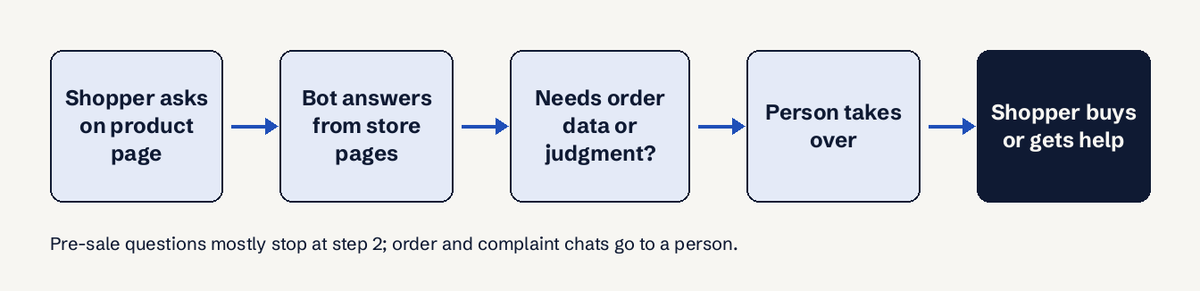
- Hybrid. The bot answers first and flags chats that need a person, who takes over. This is what most small stores should run.
When is a chat window worth adding?
A store needs live chat when shoppers leave with questions your pages already answer badly or not at all. Baymard Institute puts the average documented cart abandonment rate at 70.22%, from 50 studies published 2006 to 2025 (Baymard). Most of that is window shopping: 42% of US shoppers said they abandoned because they were "just browsing". Among the rest, several reasons are questions a chat can answer on the spot:
| Abandonment reason (Baymard, US shoppers) | Share | Can chat help? |
|---|---|---|
| Extra costs too high (shipping, tax, fees) | 40% | Partly: state the total and shipping rules early |
| Delivery was too slow | 20% | Yes: confirm delivery dates per location |
| Did not trust the site with card details | 19% | Partly: a fast human-sounding answer builds trust |
| Site wanted an account | 18% | No: fix checkout |
| Returns policy not satisfactory | 13% | Yes: explain the policy plainly |
| Could not see total cost up-front | 12% | Yes: quote the total |
A store with very few SKUs, clear pages and a simple shipping table may not need chat at all. A store selling sized, configurable or high-ticket products usually does, because each of those creates questions a product page cannot fully settle.
What questions do shoppers ask in live chat?
Shoppers ask the same few questions over and over, which is why automating them works. From a typical store's transcripts, the groups look like this:
- Delivery: cost, date, whether it ships to their city or country, cash on delivery.
- Fit and specs: size, dimensions, material, compatibility ("does this fit an iPhone 15?").
- Stock: colour or size back in stock, preorder dates.
- Returns and exchanges: window, who pays shipping, how to start one.
- Price: discount codes, bulk pricing, price match.
- Order status: where is my order, change address, cancel.
- Requests: a product, size or colour you do not sell.
Groups 1 to 5 are pre-sale and a bot can answer them from your pages. Group 6 needs order data. Group 7 is the most valuable and the most ignored, covered below.
Bot or human: who should answer which chat?
Use an AI chatbot for the repeat pre-sale questions and a person for anything that needs order data, a refund decision or a negotiation. A one-person store cannot answer chats at 2 a.m., and a bot that only answers from your own pages will not invent a delivery date.
| Chat type | Bot | Person |
|---|---|---|
| Shipping, sizing, returns policy | Best: instant, 24/7 | Fine, but slow at night |
| "Where is my order?" | Only if connected to order data | Yes |
| Complaints, damaged items | No: hand over | Yes |
| Large or wholesale enquiry | Qualify, then hand over | Yes, close the deal |
| Product you do not sell | Log it | Rarely recorded |
Two rules keep a bot honest. It should answer only from your content and say so when it does not know, and it should hand the chat to a person rather than guess a price or a policy. For the human side, a few ready replies save time: see our canned responses library and the guide to live chat best practices.
Worked example: what chat is worth to one store
Say a store gets 6,000 visits a month and converts 1.5%, or 90 orders at an average order value of ₹1,800. If 2% of visitors open chat, that is 120 chats. If chat turns just 10 of those shoppers, who would otherwise have left, into buyers, that is ₹18,000 a month in extra sales. These are illustrative numbers, not a benchmark: plug in your own visits, chat rate and order value. The point is that chat only has to save a handful of orders to pay for itself, and that it works on shoppers already in the buying mood.
Ecommerce live chat vs chatbot vs help desk
Live chat is the channel (the widget and the real-time conversation). A chatbot is who answers in that channel automatically. A help desk is where tickets, email and chats are tracked after the fact. Many stores mix them up and buy a help desk when they needed a widget that answers pre-sale questions. If most of your chats are "will this arrive by Saturday", you need fast answers on the page, not a ticket queue.
Reading transcripts for missing products
Read them weekly, because chat transcripts are the only place shoppers tell you, in their own words, what stopped them. Three things to pull out:
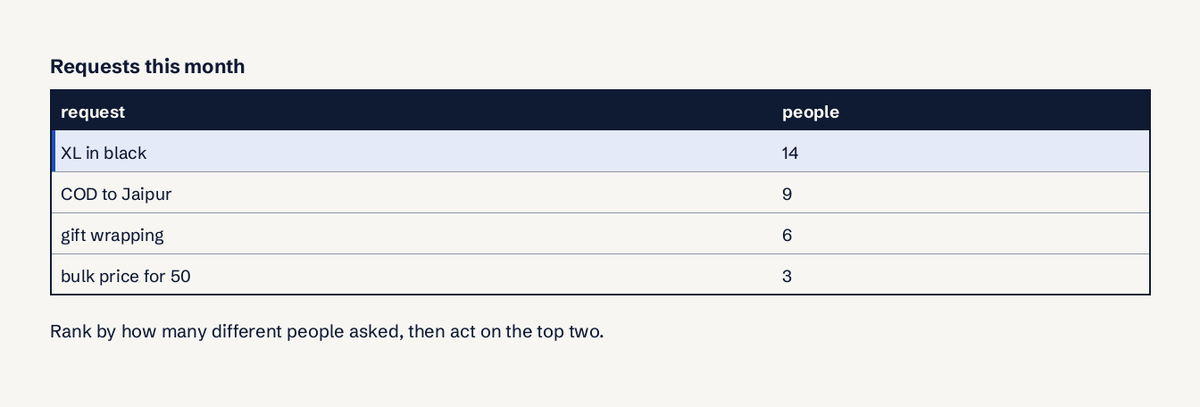
- Missing products and variants. "Do you have this in XL?" asked 14 times is a buying decision waiting for you.
- Page fixes. If 20 people ask about delivery to Bengaluru, put the delivery table on the product page.
- Objections. Price, trust and returns doubts tell you what to say in ads and on product pages.
Our guide on turning chats into voice of customer shows how to tag and count them.
Mistakes that waste a widget
- A widget that says "online" with nobody there. Set hours or let a bot answer.
- A bot that guesses. Wrong delivery dates and invented discounts cost more than no answer.
- Asking for email before answering. Answer first, ask for contact details only when the shopper wants something.
- Chat on every page with a pop-up. Use live chat triggers on product and cart pages instead.
- Never reading the transcripts. That throws away free product research.
How LuckPanda Chatbot fits
If you want the hybrid setup without a monthly per-seat bill, LuckPanda Chatbot builds a bot from your store's own pages: paste the address and try a preview with no account (up to 30 pages, 20 questions). It answers only from your content, asks at most two or three short questions, hands chats to you when a person is needed, and groups what shoppers asked for that you do not sell on a Requests board. It installs with one script line on Shopify, WooCommerce on WordPress, Wix or Webflow, and the plan is $4.99 a month (₹199 in India) for up to 10 websites. Compare it with Tidio, which prices by billable conversations (Tidio pricing).
Questions
When is a chat window worth adding?
Not every store. A store with few products and clear pages may do fine without it. Stores with sizes, variants, delivery limits or high prices usually benefit, because chat answers the questions that stop shoppers at checkout, such as delivery dates and returns.
What questions do shoppers ask in live chat?
Mostly delivery cost and dates, size and specs, stock, returns, discounts and order status. The first five are pre-sale and can be answered from your pages; order status needs order data or a person.
Bot or human: who should answer which chat?
Both: a bot for repeat pre-sale questions around the clock, and a person for orders, complaints and big enquiries. The bot should hand the chat over instead of guessing.
Reading transcripts for missing products
Review them weekly for missing products, repeated questions that a page should answer, and objections about price, trust or returns. Count how many different people asked each thing and act on the top items.
Is live chat free for ecommerce?
Some tools are free for human-only chat, such as tawk.to. AI replies and automation usually cost money, priced per seat, per conversation or by usage depending on the vendor.
Does live chat slow down my store?
A chat widget adds a script to every page. Load it asynchronously and test your page speed after installing it.