 luckpanda
Google Sheets Expense Report Template: Free Templates, Columns and Formulas
Free Google Sheets expense report templates compared, the nine columns an accountant needs, the SUMIF formula for category totals, and when to move off a sheet.
On this page
- What LuckPanda does for expenses and bills
- Which free Google Sheets expense report templates are worth copying?
- Templates ready to copy
- Google Sheets help pages you will need
- Rules your report has to follow
- What columns should an expense report have?
- How do I total expenses by category in Google Sheets?
- Does Google Sheets have an expense report template?
- How long should employees take to submit expenses?
- When should a business stop using a spreadsheet for expenses?
TL;DR: The best free Google Sheets expense report templates are Smartsheet's simple, weekly and daily reports, its business expense tracker, and the Template.net and theGoodocs sheets; all copy into your Drive with File > Make a copy. Whichever you pick, it needs nine columns and one SUMIF formula for category totals. When expenses turn into vendor bills you pay on terms, LuckPanda Purchasing records the bill, posts it to your books and tracks it until it is paid.
A Google Sheets expense report template is a spreadsheet with a header (who spent, why, which period, who approves) and one row per expense: date, vendor, description, category, payment method, amount, tax and a receipt link, with a total that subtracts any advance. Google Sheets has no official expense report in every account's template gallery, so most people copy one from Smartsheet, Template.net or theGoodocs, or build one in 10 minutes with the columns below. A spreadsheet works well for one person or a handful of reimbursements a month. It stops working when several people submit, receipts go missing and nobody can see what is still unpaid.
Paying vendors, not just reimbursing staff? Record vendor bills in LuckPanda Purchasing: drafting is free, and the module costs $4.99 per module per month (₹199 per month for a business in India) when you issue and pay.
What LuckPanda does for expenses and bills
LuckPanda is a business operating system for small businesses. Its Purchasing module covers vendors, RFQs, purchase orders, bills, expenses and vendor payouts. Here is what is live and what is not, as of 27 November 2026:
- Vendor bills (live): each bill has lines, tax and a due date, in the vendor's currency, and the vendor's invoice number is checked for duplicates, per the bills page.
- Each line is marked eligible or not for input tax credit; ineligible GST is added to the expense, not claimed.
- Recording a bill posts it to accounts payable, and vendor payouts settle it. Corrections go through cancellation or a purchase debit note, never by editing a recorded bill.
- Expenses (being built, not live yet): per the expenses page, expenses will be recorded with amount, currency, date, category and the receipt, and posted to your books. Until then, keep staff reimbursements in a sheet like the ones below.
An AI agent in LuckPanda can draft a bill; a person approves it. Pricing is per module, not per user: see pricing.
Which free Google Sheets expense report templates are worth copying?
These are the free sources that rank for this search, checked on 27 November 2026, with what each is good for.
Templates ready to copy
- Smartsheet: Simple Expense Report Template for Google Sheets: the best default. Header for purpose, employee, department and manager; lines with date, description, category and amount; Total Reimbursements minus advances; an Authorized By box for the manager's sign-off.
- Smartsheet: Business Expense Tracker for Google Sheets: for an owner tracking a year, with one tab per month and a YTD total on the main tab.
- Smartsheet: Weekly Expense Report for Google Sheets: for short trips; its "Expenses Paid with Company Funds" section keeps company-card spend apart from what the employee is owed.
- Smartsheet: Free Expense Report Templates (all formats): travel, mileage, credit card and petty cash variants when the Google Sheets set is too narrow.
- Template.net: Editable expense templates for Google Sheets: many small business layouts; you sign in with a Google account to make the copy.
- Shoeboxed: Expense Report Template Google Sheets, 4 free templates: links straight to theGoodocs' clean simple report and a travel report with employee ID and preset categories (updated 29 October 2026).
- ClickUp: Free expense report templates in Excel, Google Sheets and ClickUp: useful if you want to compare a sheet against a task-based approval flow.
Google Sheets help pages you will need
- SUMIF function: Google's reference for totalling expenses by category or by "Paid" status.
- Create an in-cell dropdown list: makes the Category and Payment method columns consistent, so totals don't split "Travel" and "travel".
- Customize a pivot table: a monthly summary by category and person without writing formulas.
Rules your report has to follow
- IRS: How long should I keep records?: 3 years in most cases, 6 years if income was under-reported by more than 25% of gross income, 7 years for bad debt or worthless securities claims.
- IRS Publication 463: US travel, meals and car expenses, and the accountable plan rules for reimbursements.
- GOV.UK: Business travel and mileage: the UK employer rules for travel and mileage payments.
What columns should an expense report have?
An expense report should have these nine columns, plus a header with the employee, purpose, period, advance received and approver.
| Column | Example | Why the accountant needs it |
|---|---|---|
| Date | 2026-11-18 | Puts the cost in the right period |
| Vendor | IndiGo | Matches the receipt and the card statement |
| Description | Mumbai to Pune client visit | Shows the business purpose |
| Category | Travel | Drives the ledger account and totals |
| Payment method | Personal card | Decides whether it is reimbursed |
| Amount | 4,250.00 | The cost before tax |
| Tax | 212.50 (5% GST) | Claimable tax, kept separate |
| Currency | INR | Needed when trips cross borders |
| Receipt link | Drive URL | The proof, one click away |
How do I total expenses by category in Google Sheets?
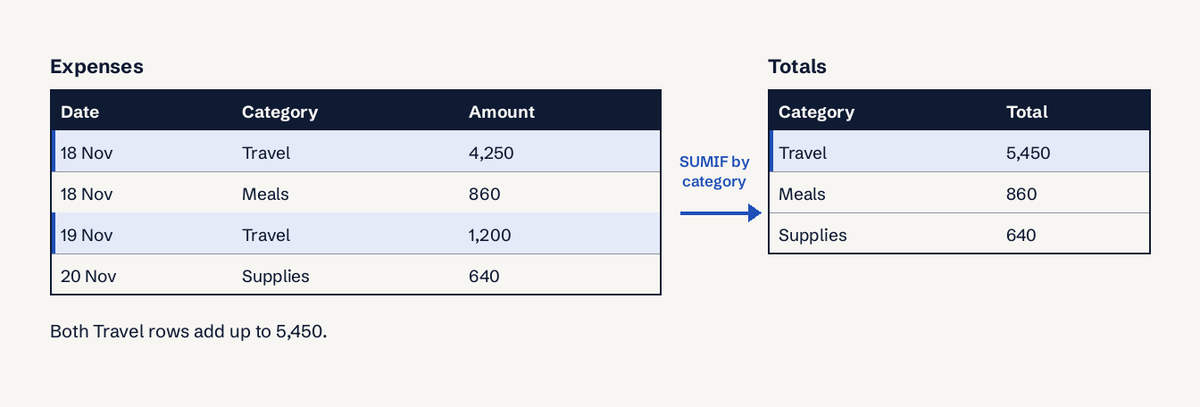
Use SUMIF. Its syntax is SUMIF(range, criterion, [sum_range]). With categories in column D and amounts in column F:
=SUMIF(D2:D200, "Travel", F2:F200)
Put the category names in a small summary block (say H2:H6) and write =SUMIF($D$2:$D$200, H2, $F$2:$F$200) next to the first one, then fill down. Add a dropdown on column D so every row uses the same spelling. For the amount owed, total the rows paid by personal card and subtract the advance:
=SUMIF(E2:E200, "Personal card", F2:F200) - B4
Does Google Sheets have an expense report template?
Not one you can rely on finding. The Sheets template gallery differs by account type and language, so most people copy a third-party template (File > Make a copy) or build the nine columns above. A copied template is a normal sheet in your Drive: you can rename columns and add the SUMIF block without breaking anything.
How long should employees take to submit expenses?
For US employers, IRS Publication 463 sets the accountable plan rules: under its safe harbor, employees account for expenses within 60 days and return any excess advance within 120 days, and advances are paid no more than 30 days before the expense. Reimbursements outside an accountable plan are treated as wages. Put the deadline in the sheet's header so it is visible every time.
When should a business stop using a spreadsheet for expenses?
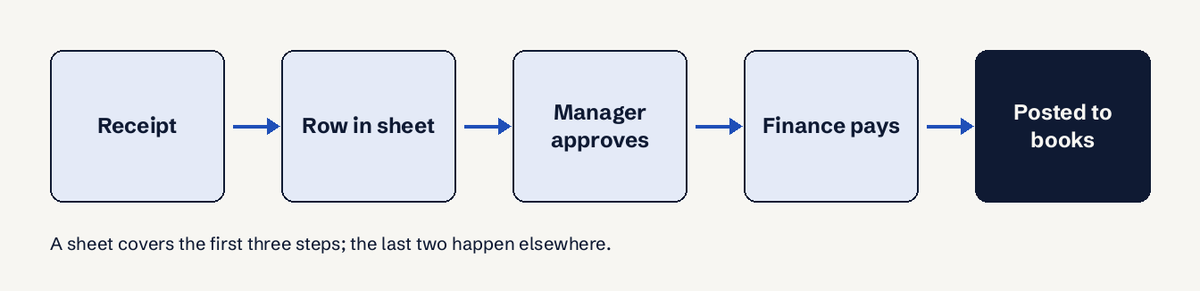
Move off a spreadsheet when one of these is true:
- More than 1 person submits and you are merging sheets by hand each month.
- You pay vendors on terms and need to know what is due this week, not just what was spent.
- Receipts and approvals live in email threads instead of next to the line.
- You claim input tax (GST, VAT) and need tax kept per line and checked against the vendor's invoice.
Vendor spend fits LuckPanda Purchasing today: bills are recorded with tax and a due date, duplicates are caught by the vendor's invoice number, and payouts settle them in the same books. Staff expense claims will move there when Expenses goes live; until then the sheet above does the job. For the wider process, see the accounts payable process step by step and managing payables.
Questions
Does Google Sheets have an expense report template?
Not reliably in every account. Copy a free one from Smartsheet, Template.net or theGoodocs, or build the nine columns in this guide.
What columns should an expense report have?
Date, vendor, description, category, payment method, amount, tax, currency and a receipt link, plus a header with employee, purpose, period, advance and approver.
How do I total expenses by category in Google Sheets?
Use =SUMIF(category_range, "Travel", amount_range), one row per category, and a dropdown so category names match.
How long should I keep expense receipts?
The IRS says 3 years in most cases, longer in the cases it lists. Other countries set their own periods; check your tax authority.
When should a business stop using a spreadsheet for expenses?
When several people submit, when you pay vendors on terms, or when you need tax per line checked against invoices.
Ready to take vendor bills out of the spreadsheet? Start free with LuckPanda Purchasing, or make a one-off bill with the free bill generator.