 luckpanda
Using Outlook as a CRM vs a Real CRM: Where It Breaks
You can use Outlook as a basic CRM with categories, contacts and follow-up flags. It breaks at deal values, team history and what clients owe.
On this page
TL;DR: Yes, you can use Outlook as a CRM for a short customer list: color categories mark stages, Contacts hold details and follow-up flags become tasks. It breaks when you need deal values, a shared history or what each client owes. LuckPanda CRM keeps one record per client with every quote, invoice and amount outstanding, while you keep writing email in Outlook.
Start free with LuckPanda CRM: creating clients is free, no card needed.
Using Outlook as a CRM works for a solo owner with roughly a few dozen active relationships. You tag emails and contacts with categories such as "Prospect" or "Quote sent", flag messages for follow-up, and keep contact cards in Outlook People. Microsoft's own small-business CRM inside Outlook, Outlook Customer Manager, was retired on 30 June 2020, so today "Outlook CRM" means either these built-in features or a separate CRM connected to Outlook.
What LuckPanda CRM does for an Outlook user
LuckPanda does not plug into Outlook. It covers the part Outlook cannot: the money and documents around each client.
- One record per client. Each client holds contact details and every quote, invoice and receipt you made for them. Typing a known client's name on a document links it to the same record. See client records.
- What a client owes, per currency. The client page shows outstanding amounts in each currency, not converted into one number.
- Contacts at a client, with one primary contact each.
- Free to keep. Creating and editing clients is free. You pay $4.99 per module per month (₹199 for a business in India) only to issue, send or share documents, per module and not per user (pricing).
- API and MCP. An agent can search clients and read a client's documents and balance; agents draft, a person decides.
What it does not do: no Outlook add-in, no email sync and no open tracking. If logging every email inside the CRM matters most, an Outlook-integrated CRM below fits better.
Outlook alone vs Outlook plus a CRM
| Criterion | LuckPanda CRM (with Outlook for email) | Outlook alone | HubSpot CRM for Outlook | Pipedrive | Nutshell |
|---|---|---|---|---|---|
| Starting price | Free to keep clients; $4.99 per module per month | Included in Microsoft 365 | Free CRM, paid editions | US$14 per seat per month (annual) | $13 per user per month |
| Pricing basis | Per module, not per user | Per mailbox | Per seat on paid tiers | Per seat | Per user |
| Deal stages | Pipeline page on the site; check its status | Color categories only | Yes | Yes | Yes |
| Shared team history | Yes, one client record | No, categories and flags are per mailbox | Yes | Yes | Yes |
| What a client owes | Yes, per currency, from invoices | No | Needs add-ons | No (invoicing via apps) | No |
| Quotes and invoices | Built in (Sales module) | No | Quotes on paid tiers | Via integrations | No |
| Outlook add-in or sync | No | Native | Yes | Sync from the Growth plan | Yes, add-in |
Prices read on 2026-11-24 from each vendor's own pricing page.
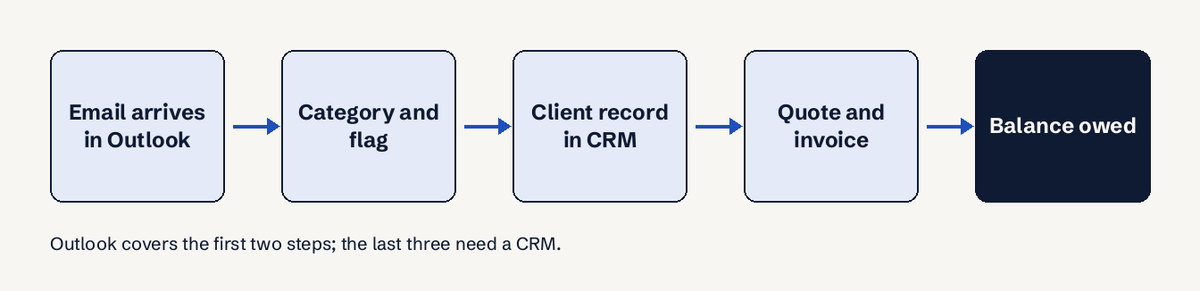
Can Outlook be used as a CRM?
Outlook can be used as a CRM for a small list. Set it up in four steps:
- Create color categories for stages: Lead, Quote sent, Won, Lost. Right click a message, choose Categorize, then pick or create one.
- Save each customer to Outlook Contacts (People) and give the contact the same category.
- Flag emails for follow-up with a due date. On Microsoft 365 and Outlook.com accounts, flagged mail appears as a task in Microsoft To Do.
- Use a shared mailbox such as sales@ if two people answer customers; your Microsoft 365 admin creates it.
One catch: Microsoft states that IMAP accounts do not support categories (Microsoft Support). If your business email is IMAP on a regular host, step 1 fails.
What are Outlook's limits as a CRM?
Outlook's limits as a CRM come from it being a mailbox, not a database of deals.
- No deal value or stage report. A category says "Quote sent"; it cannot total what is in that stage.
- Personal, not shared. Categories, flags and notes live in your mailbox. A colleague taking over a client starts without them.
- No money. Outlook does not know which invoices are paid. A follow-up about payment means opening your accounting tool.
- Flags get buried. A flagged email from three weeks ago scrolls out of sight; nothing escalates it.
- No source of a lead. Outlook cannot tell you whether an enquiry came from your website form or a referral.
Which CRMs integrate with Outlook?
CRMs that integrate with Outlook include HubSpot, Pipedrive and Nutshell, among others.
- HubSpot offers a free CRM for Outlook with an add-in, email templates, open tracking and two-way calendar sync (HubSpot). Strong if email tracking is the priority.
- Pipedrive syncs Outlook email on its paid tiers, starting at US$14 per seat per month billed annually, with a 14-day trial (Pipedrive pricing). Its Smart Bcc forwards threads into deals.
- Nutshell has an Outlook add-in that shows the contact, open leads and tasks beside an email; plans start at $13 per user per month (Nutshell pricing). Its first email sync brings in 90 days of mail.
LuckPanda is not on this list because it has no Outlook integration. It fits businesses whose client questions are about quotes, invoices and balances rather than email logging.
Is Microsoft Dynamics required for Outlook CRM?
No. Microsoft Dynamics 365 Sales has an Outlook app, but you do not need Dynamics to run a CRM next to Outlook. Any of the CRMs above work with a standard Microsoft 365 mailbox, and Outlook's own categories and flags need nothing extra. Dynamics is built for larger sales teams; most small businesses never need it.
Which option fits your business?
- Choose LuckPanda CRM if your client follow-ups are about quotes, invoices and payments, you bill in more than one currency, or you want to pay per module rather than per user.
- Choose Outlook alone if you are one person with a short list and no need for reports.
- Choose HubSpot, Pipedrive or Nutshell if logging and tracking every email inside the CRM is the main job.
Signs it is time to move off Outlook alone: a second person talks to customers, you keep a spreadsheet to see the pipeline, or a payment follow-up slipped because a flag got buried.
Questions
Can Outlook be used as a CRM?
Yes, for a small customer list. Use color categories for stages, Contacts for details and follow-up flags for reminders. It has no deal values, shared history or reports.
What are Outlook's limits as a CRM?
It cannot total deals by stage, share your categories and notes with colleagues, show what a client owes, or record where a lead came from. Categories also do not work on IMAP accounts.
Which CRMs integrate with Outlook?
HubSpot, Pipedrive and Nutshell all offer Outlook add-ins or sync. LuckPanda does not integrate with Outlook; it keeps client records with their quotes, invoices and balances.
Is Microsoft Dynamics required for Outlook CRM?
No. Dynamics 365 is one option, but third-party CRMs and Outlook's built-in tools work without it.
What happened to Outlook Customer Manager?
Microsoft retired Outlook Customer Manager on 30 June 2020. It launched in November 2016 as a light CRM inside Outlook (TechCrunch).
Keep your clients, quotes and balances in one place: start free with LuckPanda CRM, or make a free quotation first.