 luckpanda
6 Best CRM for Accountants and Small Firms (Compared)
The best CRM for accountants depends on whether you need billing or practice workflow. 6 accounting CRMs compared on price at 5 users.
On this page
TL;DR: The best CRM for accountants depends on which job hurts more. LuckPanda suits small firms and solo accountants who want each client's engagement quote, recurring fee invoices and unpaid balance on one record for $4.99 a month per module (₹199 in India), not per user. Financial Cents, Karbon and Canopy are full practice management tools with client portals and workflows at $49 to $149 per user, and HubSpot and Zoho CRM are general sales CRMs for firms chasing new clients.
Try it with a real client first: draft an engagement quote in the free quote generator, no account needed, then see the LuckPanda CRM module.
A CRM for accountants is the system that keeps every client, the people at that client, the services you agreed to provide and the fees they owe in one place, so the firm stops running on inboxes and spreadsheets. Accounting firms use two kinds: practice management software (Financial Cents, Karbon, Canopy, TaxDome) that adds client portals, recurring deadline workflows and engagement letters, and general CRMs (HubSpot, Zoho CRM) built to win new clients. We read each vendor's own pricing page and compared six options on real cost for a 5-person firm and on how much of the client-to-fee work each covers.
How we judged the accounting CRMs
We scored each tool on the work that fills an accounting firm's week:
- Cost for a 5-person firm, on the cheapest paid plan, from the vendor's page.
- Engagement letters and proposals: can you agree the scope and fee from the client record.
- Recurring fees and invoicing: monthly bookkeeping and annual returns are repeat billing.
- Recurring deadline workflows: monthly, quarterly and annual work generated on schedule.
- Client portal: a secure place for clients to upload documents and answer requests.
- Currencies and countries, for firms with clients abroad.
No affiliate links and no vendor ratings. Prices were read on 21 November 2026 unless a different date is shown. TaxDome is a well-known option for tax firms, but its pricing page blocked our check behind a bot test, so we have not listed a price we could not verify.
Accounting CRM summary table
| Tool | Type | Pricing model | Cheapest paid plan | 5 users / month | Client portal | Best for |
|---|---|---|---|---|---|---|
| LuckPanda | Business system with CRM | Per module, not per user | $4.99 per module ($9.98 for CRM + Sales) | $9.98 | No | Solo and small firms billing fees to clients in several countries |
| Financial Cents | Practice management | Per user, annual | Solo $19 (1 user); Team $49/user | $245 | Yes | Small firms that want workflow plus CRM at a lower seat price |
| Karbon | Practice management | Per user | Team $59/user, annual | $295 | Yes | Email-heavy firms that run work from a shared inbox |
| Canopy | Practice management | Per user, annual | Standard $74/user | $370 | Yes | Tax-focused firms that want eSign and documents included |
| HubSpot | General CRM | Per seat | Starter $7/seat (offer; regular $20) | $35 | No | Firms growing through marketing |
| Zoho CRM | General CRM | Per user, annual | Standard ₹800/user | ₹4,000 | Enterprise plan | Firms that want to customise everything |
USD unless shown. HubSpot and Zoho prices were read on 17 November 2026; Zoho showed India pricing to our India-based check, taxes extra.
1. LuckPanda
What it is: a business operating system for small businesses where sales, CRM, purchasing, inventory, finance and compliance share one record of clients, items and money. Home page line: "Run your whole business in one place."
Best for: solo accountants, bookkeepers and firms of 2 to 10 people whose pain is the gap between "the client agreed the fee" and "the client paid", especially with clients in other countries.
What it does for an accounting firm today:
- One record per client. Each client holds their contact details, their own country and tax ID, and every quote, invoice and receipt you have made for them. Typing a known client's name on a document links it to the same record (CRM module).
- Engagement fee to invoice without retyping. Quote the engagement, then invoice it. The Sales module covers quotes, proforma invoices, invoices, recurring invoices (for monthly bookkeeping retainers), receipts, credit notes, payment links and reminders (pricing).
- What a client owes, per currency. A client's page shows the amount outstanding in each currency instead of converting it into one number.
- Documents formatted by the client's country, for example ₹1,24,500.00, $12,400.00 or 12.400,00 €, never your browser's locale.
- AI agent drafts, a person decides. Through the REST API or MCP an agent can search clients, read a client's documents and balance, and create client records. Agents never send on your behalf.
Pricing: keeping clients, drafting and branded PDFs are free. Issuing, sending, share links, payment links and team invites need the module: $4.99 per module per month (₹199 in India, tax included), 25% off annually. It is per module, not per user, so a 5-person firm pays the same as a solo practice.
Limits, plainly: LuckPanda is not practice management software. It has no client portal, no document requests, no e-signature and no recurring task workflows for return deadlines. The lead list, deal pipeline and enquiry forms are being built and meetings are marked Building. Use it for clients and fees; if your main need is a client portal and deadline workflow, pick one of the next three.
2. Financial Cents
What it is: practice management software for accounting firms, with workflow, a client CRM and billing in one app.
Best for: small firms that want a client portal and recurring workflows without the highest seat prices.
Pricing: Solo $19 a month for single-user firms, Team $49 and Scale $69 per user per month, billed annually on a 12-month agreement. 14-day free trial, no card (Financial Cents pricing).
Strengths: the pricing page lists a client CRM and database, client portal, proposals and engagement letters, e-signatures, retainers, time tracking and a QuickBooks Online integration on every plan. Watch: auto follow-ups for client tasks and Zapier are on Scale, not Team.
3. Karbon
What it is: practice management built around a shared team inbox, workflows and client timelines.
Best for: firms where client work starts in email and several people handle each client.
Pricing: Team $59 per user per month billed annually or $79 monthly, Business $89 or $99, Enterprise custom. Monthly billing is only for teams of 4 or more (Karbon pricing).
Strengths: every plan includes email triage, a client portal, client management with activity timelines, document management, and billing and payments. Watch: automatic client reminders and task automation are on Business, which is $445 a month for 5 users billed annually.
4. Canopy
What it is: practice management software for accounting and tax firms, with CRM, documents, workflow, time and billing.
Best for: tax-focused firms that want eSign and document management included from the first plan.
Pricing: Standard $74, Plus $109 and Premium $149 per user per month billed annually; annual billing saves 20% (Canopy pricing).
Strengths: Standard includes CRM and client management, document management and eSign, a client portal with secure messaging, recurring task workflows, and invoicing and payments. Its "Canopy Coworker" AI is included in every plan. Watch: user roles and access controls start on Plus.
5. HubSpot
What it is: a general CRM platform with marketing, sales and service tools on one contact database.
Best for: firms that grow through content, referrals and email marketing and need a pipeline for prospects.
Pricing: a free plan for up to 2 users. Starter is $7 per seat per month on an annual commitment, shown as a limited-time offer for new customers against a regular $20 (HubSpot pricing, read 17 November 2026).
Strengths: the strongest marketing tools here and a free tier. Watch: no recurring deadline workflows or client portal for tax documents; you still need practice management and billing elsewhere.
6. Zoho CRM
What it is: Zoho's customisable CRM, part of a large suite that also includes Zoho Books.
Best for: firms with someone who enjoys configuring modules and workflows.
Pricing: free for 3 users. In India, Standard ₹800, Professional ₹1,400, Enterprise ₹2,400 and Ultimate ₹2,600 per user per month billed annually, taxes extra. Customer portals are on Enterprise (Zoho CRM pricing, read 17 November 2026).
Strengths: deep customisation and a 3-user free edition. Watch: a client portal means the Enterprise plan, ₹12,000 a month for 5 users.
What CRM do accountants use?
Accountants mostly use one of two kinds of tool. Firms that need to manage existing clients use practice management software with a built-in CRM: TaxDome, Karbon, Canopy and Financial Cents are the names that appear most often. Firms that need to win new clients use a general sales CRM such as HubSpot, Zoho CRM or Pipedrive. Solo practitioners and small firms whose main problem is fees and collections can use a business system such as LuckPanda that keeps clients and invoices together.
Do accounting firms need a CRM or practice management software?
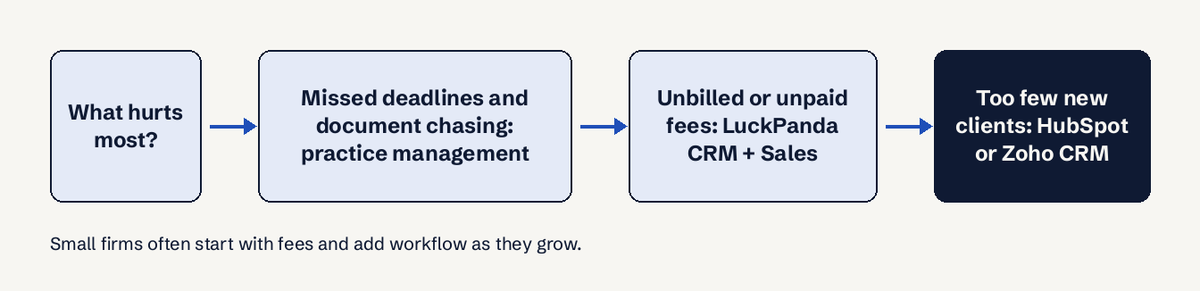
Most firms need practice management first, because their revenue repeats: the same clients return every month, quarter and year, and the risk is a missed deadline, not a missed sale. A sales CRM earns its place when you actively market for new clients. A CRM with invoicing fits in between: when your work is simple enough to track on a checklist but you bill many clients, keeping every client's quotes, invoices and balance on one record removes the spreadsheet you use to chase fees.
What does an accounting CRM cost?
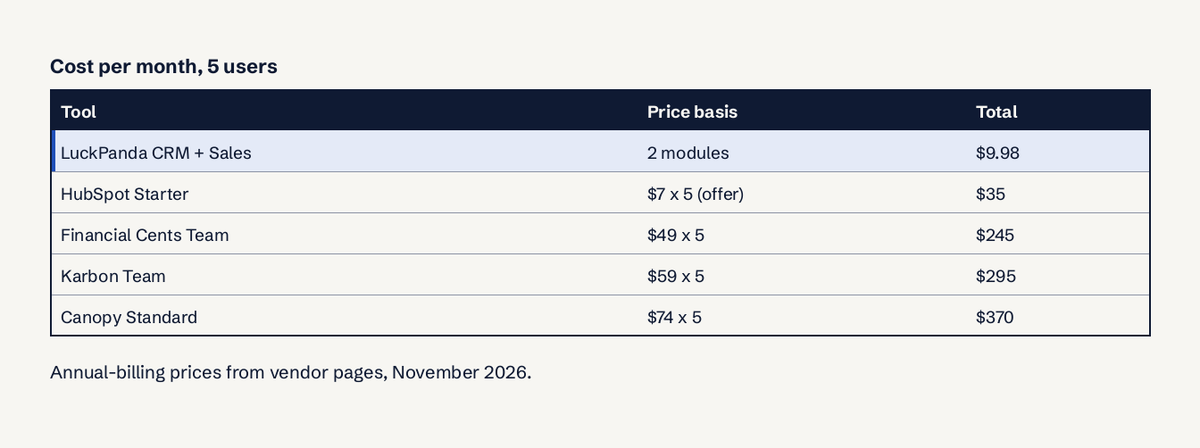
An accounting CRM costs between nothing and about $150 per user per month. For a 5-person firm billed annually: $9.98 a month on LuckPanda (CRM plus Sales modules, any team size), $35 on HubSpot Starter at the current offer ($100 at the regular $20), $245 on Financial Cents Team, $295 on Karbon Team and $370 on Canopy Standard. A solo accountant pays $19 a month on Financial Cents Solo. HubSpot is free for 2 users and Zoho CRM for 3.
How to choose
- List what went wrong last quarter: a missed filing, a client chased for documents three times, or fees invoiced late.
- Count the people who need access and multiply by the seat price. That is your real monthly cost.
- Check whether you need a client portal now or whether email and a shared folder still work.
- Check currencies if you have clients abroad.
- Run one real client through the trial, from engagement to paid invoice.
Our recommendation for a solo practice or a small firm with clients across borders: start with LuckPanda for clients and fees, and add practice management when deadline workflow becomes the bottleneck. Related guides: best CRM for agencies, retainer invoices and running a CRM in Excel.
Questions
What is the best CRM for a small accounting firm?
For a small firm focused on billing clients, LuckPanda keeps clients, engagement quotes and invoices together for $4.99 a month per module. For a firm that needs a client portal and recurring deadline workflows, Financial Cents is the lowest-priced practice manager here at $49 per user per month billed annually.
Is there a free CRM for accountants?
Yes. HubSpot is free for up to 2 users and Zoho CRM for 3 users. LuckPanda lets you keep clients and draft quotes and invoices free, and charges only when you issue or send.
Does a CRM replace accounting software like QuickBooks or Tally?
No. A CRM manages your firm's clients and fees; the books you keep for clients stay in their accounting software. Financial Cents lists a QuickBooks Online integration on every plan.
Can I start with a spreadsheet?
You can, and many solo accountants do. Our guide to a CRM in Excel shows a workable layout; most firms outgrow it when a second person starts updating it.
Which accounting CRM handles clients in different countries?
LuckPanda stores each client's own country and tax ID, formats documents by that country and shows balances per currency on every plan, which suits firms serving clients in India, the US, the UK and Europe.
Start with one real client: draft an engagement quote free and keep it on the client's record in LuckPanda CRM.