 luckpanda
8 Best Invoice Software for Freelancers, Compared on Fees and Limits
Zoho Invoice, Invoice Ninja, Wave, FreshBooks, Bonsai, Stripe, PayPal and LuckPanda compared on free tier limits, payment fees and multi-currency, with prices from each vendor page.
On this page
- How we judged the tools
- Best invoice software for freelancers: summary table
- 1. Zoho Invoice
- 2. Invoice Ninja
- 3. Wave
- 4. FreshBooks
- 5. Bonsai
- 6. LuckPanda
- 7. Stripe Invoicing
- 8. PayPal Invoicing
- Which free tool should you start with?
- Which invoicing tools handle multiple currencies?
- What fees do invoicing apps charge on card payments?
- Do freelancers need accounting software or just invoicing?
- How to choose
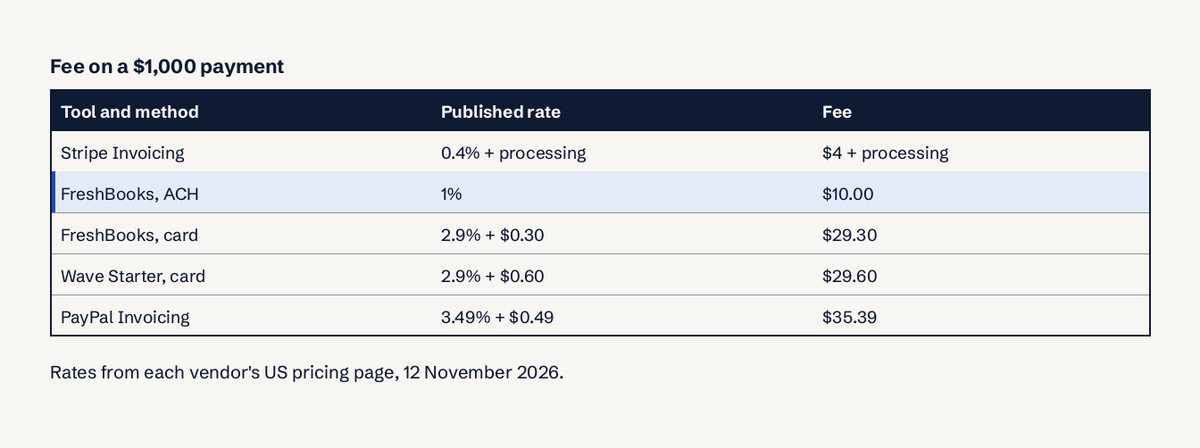
TL;DR: For most freelancers the best invoice software is Zoho Invoice if you want free (500 invoices a year), Invoice Ninja if you have five clients or fewer, Wave if you are in the US or Canada and want free accounting too, and FreshBooks if you bill by the hour. Bonsai suits freelancers who also need contracts and proposals. Watch the payment fees: on a $1,000 card payment they range from about $4 plus processing to $35.39.
The best invoice software for freelancers is the one whose free tier covers your client count and whose payment fees you can live with, because those two numbers decide your real cost far more than the monthly price. We compared eight tools on their own pricing pages on 12 November 2026: free tier limits, monthly price, card and bank payment fees, multi-currency support and whether clients get a portal. Prices change often; every figure below links to the vendor's page so you can check it before you sign up.
How we judged the tools
We scored each tool on the constraints a solo freelancer actually hits:
- Free tier limits. How many invoices or clients before you must pay.
- Monthly price of the cheapest plan that removes those limits.
- Payment fees per card or bank payment, which compound with every invoice.
- Multi-currency. Can you invoice a client abroad in their currency, and can they pay online in it?
- Client portal and reminders. Fewer "did you get my invoice?" emails.
- Accounting. Whether the same tool keeps your books, or you need a second one.
We did not use affiliate links or vendor ratings. Where a vendor did not publish a number, we say so instead of guessing.
Best invoice software for freelancers: summary table
| Tool | Free plan | Cheapest paid plan | Card fee (US) | Multi-currency | Best for |
|---|---|---|---|---|---|
| Zoho Invoice | Yes, 500 invoices/year | None, it is free | Gateway's own fee | Yes, 165+ currencies | Free invoicing with a client portal |
| Invoice Ninja | Yes, up to 5 clients | Pro $14/month | Gateway's own fee | Yes | Few clients, or self-hosting |
| Wave | Yes (Starter) | Pro $19/month | 2.9% + $0.60 | Invoices yes; Pay Now only in home currency | US and Canada, free accounting |
| FreshBooks | No | Lite $23/month, 5 clients | 2.9% + $0.30; ACH 1% | Yes | Hourly billing and bookkeeping |
| Bonsai | No invoicing on Basic | Essentials $25/month ($19 annual) | Not published on pricing page | Yes | Contracts, proposals and invoices in one |
| LuckPanda | Drafts and branded PDFs free | Sales module $4.99/month (₹199 in India) | Not published | Yes, formatted by country | Cross-border freelancers, India-based |
| Stripe Invoicing | No monthly fee | 0.4% per paid invoice | Plus Stripe processing | Yes | Tech-savvy freelancers on Stripe |
| PayPal Invoicing | Free to send | None | 3.49% + $0.49 | Yes | Clients who already pay by PayPal |
Prices checked 12 November 2026 on each vendor's pricing page, in USD unless stated.
1. Zoho Invoice
What it is: Zoho's standalone invoicing app, separate from its paid Zoho Books accounting product.
Best for: freelancers who want a genuinely free tool with no client cap.
Pricing: free. The Zoho Invoice pricing page lists up to 500 invoices a year, 2 additional users and 3 projects, with "Powered by Zoho Invoice" branding on the free plan. Recurring invoices, automatic payment reminders, quotes, time logging, expense tracking and a client self-service portal are included.
Multi-currency: yes. You can add currencies and fetch exchange rates for more than 165 currencies (Zoho help).
Limits: 500 invoices a year is roughly 41 a month; plenty for most freelancers, tight if you bill many small jobs. Payment fees are whatever your connected gateway charges. When you outgrow it, Zoho points you to Zoho Billing, which is paid.
2. Invoice Ninja
What it is: an open-source invoicing app you can use hosted or run on your own server.
Best for: freelancers with a handful of regular clients, or anyone who wants to self-host.
Pricing: the Invoice Ninja plans are Free ($0, up to 5 clients, unlimited invoices), Ninja Pro ($14/month or $140/year, unlimited clients, reminders, reports, custom invoice designs) and Enterprise (from $18/month or $180/year, multiple users, bank sync, e-invoicing and PEPPOL).
Multi-currency: yes, with automatic conversion. Gateways include Stripe, PayPal, Square and GoCardless.
Limits: the 5-client cap is the catch; automatic reminders need Pro. Apps exist for macOS, Windows, Linux, iOS and Android.
3. Wave
What it is: free accounting and invoicing for small businesses, focused on the US and Canada.
Best for: US or Canadian freelancers who want invoicing and bookkeeping in one free tool.
Pricing: per Wave's pricing page, Starter is free and Pro is $19/month or $190/year. Card payments cost 2.9% + $0.60 on Starter (Amex 3.4% + $0.60). Pro waives the $0.60 on the first 10 transactions each month.
Multi-currency: you can create foreign currency invoices, but the "Pay Now" button only appears on invoices in your business's own currency (Wave help). For a client abroad, that means bank transfer.
Limits: the $0.60 fixed fee is high on small invoices: on a $50 invoice it adds 1.2 percentage points to the cost.
4. FreshBooks
What it is: invoicing, time tracking and accounting built for service businesses.
Best for: freelancers who bill by the hour and want time, expenses and invoices connected.
Pricing: the FreshBooks pricing page lists Lite at $23/month for 5 billable clients, Plus at $43/month for 50 clients and Premium at $70/month for unlimited clients, with team members at $11/month per user. It was showing an 80% discount for the first 4 months when we checked. Card payments are 2.9% + $0.30, bank transfers (ACH) 1%.
Multi-currency: yes; you can invoice a client in their currency.
Limits: no free plan, and the Lite plan's 5-client limit pushes many freelancers to Plus quickly. It is the most expensive tool here once the promotion ends.
5. Bonsai
What it is: a freelancer and agency workspace: proposals, contracts, time tracking, projects and invoicing.
Best for: freelancers who want the proposal, contract and invoice in one flow.
Pricing: from Bonsai's pricing, invoicing starts on Essentials at $25/user/month ($19 billed annually). Basic ($15, or $9 annual) does not include invoices and payments. Premium is $39 ($29 annual).
Payment fees: Bonsai charges processing fees that vary by method; they are in its help centre, not on the pricing page.
Limits: you pay for a workspace even if you only need invoices. Good value if you would otherwise pay for a separate e-signature tool.
6. LuckPanda
What it is: our product: a business operating system for small businesses whose Sales module makes quotes, invoices, receipts, credit notes and recurring invoices, built in India for people who bill across borders.
Best for: freelancers who bill clients in several countries and want each invoice in the client's currency and formatted the way that country expects (₹1,24,500.00, $12,400.00, 12.400,00 €).
Pricing: from the LuckPanda pricing page: drafting invoices and downloading PDFs is free without an account; free PDFs carry a small "Made with LuckPanda" footer and a faint watermark. Issuing numbered invoices, sending them, share links, payment links and clean PDFs need the Sales module at $4.99/month (₹199 in India, tax included). Priced per module, not per user.
Limits: no time tracking for hourly billing, and payment link fees are not published on the pricing page. It is a newer product than the others here. You can try the free invoice generator before deciding anything.
7. Stripe Invoicing
What it is: invoicing on top of Stripe's payments platform.
Best for: freelancers already on Stripe, or developers who want an API.
Pricing: per Stripe Invoicing pricing, Starter costs 0.4% per paid invoice and Plus 0.5% (adds quotes), with no monthly fee. Stripe's card processing fee is charged on top; in India, for example, it is 2% for domestic cards and 3% for international ones, plus 2% when currency conversion applies (Stripe India pricing).
Limits: no bookkeeping, and the interface is built for businesses rather than for one person sending ten invoices a month.
8. PayPal Invoicing
What it is: invoices sent from a PayPal Business account.
Best for: clients, often individuals or overseas clients, who already pay with PayPal.
Pricing: sending invoices is free. A US invoice payment costs 3.49% + $0.49 (PayPal merchant fees), plus extra fees for international and currency-converted payments.
Limits: the most expensive way to be paid here on a large invoice, and no accounting.
Which free tool should you start with?
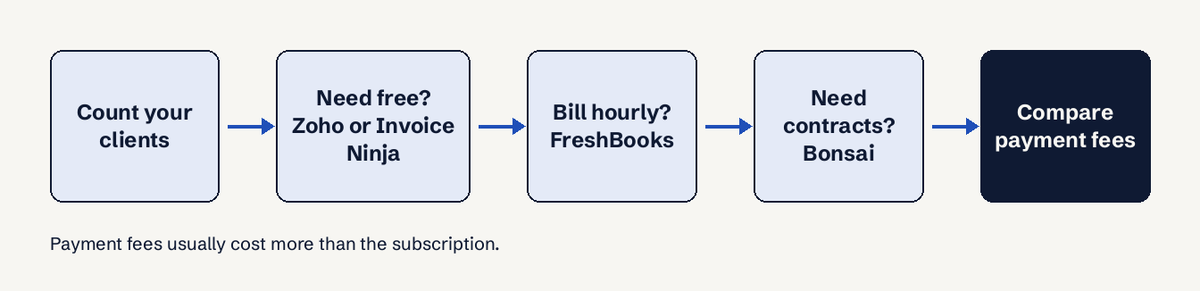
Zoho Invoice is the best free invoicing software for most freelancers: 500 invoices a year, no client cap, a client portal and multi-currency, all at $0. Invoice Ninja's free plan is better if you have 5 clients or fewer and want open source. Wave is the best free choice if you also want free bookkeeping and are based in the US or Canada. For a one-off invoice without signing up, a free generator such as ours is enough.
Which invoicing tools handle multiple currencies?
All eight let you invoice in a foreign currency, but they differ on what happens next:
- Zoho Invoice and Invoice Ninja handle exchange rates and online payment in other currencies through their gateways.
- Wave creates foreign currency invoices, but the Pay Now button only works in your home currency.
- FreshBooks invoices in the client's currency.
- Bonsai lets you set the currency per invoice from 100+ currencies; FX fees apply when the client pays in another currency (Bonsai help).
- LuckPanda issues in any currency and formats amounts by the invoice's country.
- Stripe and PayPal accept many currencies but charge a conversion fee when they convert.
If most of your clients are abroad, the bank fee on the receiving side often costs more than the software. See how to invoice international clients for the bank details and wording to use.
What fees do invoicing apps charge on card payments?
Card fees from the vendors' US pages: Wave 2.9% + $0.60, FreshBooks 2.9% + $0.30 (ACH 1%), PayPal Invoicing 3.49% + $0.49, Stripe Invoicing 0.4% per paid invoice plus Stripe's processing. Zoho Invoice and Invoice Ninja charge nothing themselves; the gateway you connect sets the fee. Two ways to cut the cost:
- Offer bank transfer on every invoice, with your full bank details, so large invoices don't go through a card.
- For a client who must pay by card, put the fee in your rate, not as a surcharge line; surcharging card payments is restricted in some places, including the UK and EU for consumer payments.
Do freelancers need accounting software or just invoicing?
Most freelancers need invoicing first and accounting only once they register for GST or VAT, hire help, or have more than a handful of expenses to track. Invoicing software numbers invoices, tracks who has paid and sends reminders. Accounting software adds a ledger, bank reconciliation and tax reports. Wave and FreshBooks do both; Zoho Invoice and Invoice Ninja do invoicing with light expense tracking; Stripe and PayPal do neither beyond the payment itself. If your accountant does your year-end from a spreadsheet, invoicing alone is fine. Our guide to invoicing as a freelancer covers what each invoice must contain.
How to choose
- Under 5 clients, no budget: Invoice Ninja Free.
- More clients, no budget: Zoho Invoice.
- US or Canada, want free books: Wave.
- Hourly work, happy to pay: FreshBooks.
- Proposals and contracts too: Bonsai Essentials.
- Clients in several countries: Zoho Invoice or LuckPanda, plus clear bank details for transfers.
- Clients insist on PayPal: PayPal Invoicing, priced into your rate.
Whatever you pick, set clear payment terms such as Net 30 on every invoice; the terms get you paid faster than the software does.
Questions
What is the best free invoicing software for freelancers?
Zoho Invoice, for most freelancers: free for up to 500 invoices a year, with no client limit, a client portal, reminders and multi-currency. Invoice Ninja is free for up to 5 clients, and Wave is free in the US and Canada with bookkeeping included.
Which invoicing tools handle multiple currencies?
Zoho Invoice, Invoice Ninja, FreshBooks, Bonsai, LuckPanda, Stripe and PayPal all invoice in other currencies. Wave can create foreign currency invoices, but its Pay Now button only works in your home currency.
What fees do invoicing apps charge on card payments?
On US pricing pages checked 12 November 2026: Wave 2.9% + $0.60, FreshBooks 2.9% + $0.30 (ACH 1%), PayPal Invoicing 3.49% + $0.49, and Stripe Invoicing 0.4% per paid invoice on top of Stripe's processing fee.
Do freelancers need accounting software or just invoicing?
Just invoicing at the start. Add accounting when you register for GST or VAT, track many expenses or need bank reconciliation. Wave and FreshBooks combine both.
Is FreshBooks worth it for a freelancer?
If you bill by the hour and want time tracking, expenses and invoices in one place, yes. If you bill fixed fees to a few clients, a free tool does the same job.
Can I invoice without any software?
Yes. A Word or Google Docs template, or a free online generator, is fine for a few invoices a month. Software earns its keep once you need numbering, reminders and a record of who has paid.