 luckpanda
Contact Management Software for Small Business: 7 Options Compared
Seven contact management tools for small businesses with real prices, free plan limits and which ones link contacts to quotes and invoices.
On this page
- How we judged
- Summary table
- 1. LuckPanda CRM
- 2. HubSpot CRM
- 3. Zoho CRM
- 4. Bigin by Zoho
- 5. Capsule CRM
- 6. Less Annoying CRM
- 7. Bitrix24
- What features should contact management software have?
- Can contact management software sync with Gmail and Outlook?
- How do I move contacts from a spreadsheet?
- Contact management vs CRM: which do I need?
- How much does contact management software cost?
- How to choose
TL;DR: For a small business that sells, quotes and invoices, LuckPanda CRM is our pick: client records are free to keep, each client sits next to every quote, invoice and receipt you made for them, and the paid module is $4.99 a month (₹199 in India) per module, not per user. If you only need a free address book for a sales team, HubSpot (2 users, 1,000 contacts) and Zoho CRM (3 users) have the most generous free plans. Less Annoying CRM ($15 per user) and Bigin ($7 per user) are the simplest paid picks.
Start free with LuckPanda CRM: no card, no account needed for the free tools.
Contact management software for a small business is a shared, searchable list of the people you sell to, with their details, their company and the history of what you did together. The best choice depends on two things most lists skip: how the price grows (per user or flat) and whether a contact is connected to the money, meaning the quotes, invoices and payments you send. A spreadsheet stops working when two people edit it or when you need to know what a client owes. Below are seven options with prices read from each vendor's pricing page on 28 November 2026.
How we judged
We ranked each option on criteria a small business can check:
- Cost for a team of 1 to 5, including whether the price is per user.
- Free plan limits: users, contacts and how long it lasts.
- Contacts linked to documents: can you see a client's quotes, invoices and outstanding balance on their record?
- Setup time: can one person start the same day without a consultant?
- Room to grow: pipeline, forms, API.
Summary table
| Option | Free plan | Paid price | Priced per | Contacts linked to invoices |
|---|---|---|---|---|
| LuckPanda CRM | Keep clients free | $4.99/month (₹199 in India) | Module | Yes, built in |
| HubSpot CRM | 2 users, 1,000 contacts | Paid Starter tiers | User | Via payment links and add-ons |
| Zoho CRM | 3 users | Standard and up | User | Via Zoho apps |
| Bigin by Zoho | 1 user, 500 records | From $7/user/month (annual) | User | Via Zoho apps |
| Capsule CRM | 2 users, 250 contacts | From $18/user/month (annual) | User | Via QuickBooks, Xero, FreeAgent |
| Less Annoying CRM | 30-day trial | $15/user/month | User | No |
| Bitrix24 | 1-2 users | From $49/month for 5 users (annual) | Organization | Invoices from Standard plan |
1. LuckPanda CRM
Best for: small businesses that quote and invoice their clients and want contacts and money in one place. Pricing: free to keep clients; $4.99 per module per month (₹199 in India), 25% off annually. Detail we checked: a client's balance is shown per currency on their record.
It is first on this list because of criteria 1 and 3: the price does not grow with users, and the contact record already holds the quotes and invoices. If you already use our invoice generator, the clients you bill become CRM records.
LuckPanda CRM keeps each client as one record with their contact details and every quote, invoice and receipt you have made for them. Here is what that means in practice:
- No double entry. Type a known client's name on a quote, invoice or receipt and LuckPanda links the document to the same record, or creates the client if it is new.
- See what a client owes. Each client shows their documents and the amount outstanding in each currency, not converted into one number. Useful when you sell to clients in India and abroad.
- Contacts inside clients. Each client can have several contacts, with one primary contact.
- Leads, pipeline and forms are listed as live on the CRM module page; meetings are marked Building, so do not plan on them yet.
- API and MCP. With an API key, an AI agent can search clients, read a client's documents and balance and create client records. Agents never send on your behalf: a person approves.
Pricing, from luckpanda.app/pricing: creating and editing clients is free. The CRM module is ₹199 a month for a business in India (₹1,791 a year) and $4.99 a month elsewhere, priced per module, not per user. A team of five pays the same as a team of one.
Where it stops: LuckPanda does not list email inbox sync or a mobile app on its CRM page. If your team lives in Gmail threads and needs every email logged against a contact, Capsule or HubSpot do that today.
2. HubSpot CRM
Best for: sales and marketing teams who want a free CRM with email tracking and a large app marketplace. Pricing: the free CRM covers up to two users and 1,000 contacts with no expiry date (HubSpot, read 28 Nov 2026). Detail we checked: the free tier includes deal pipelines, a meeting scheduler, live chat, payment links and access to 2,000+ integrations.
What it does well: the free plan is deep. Where it stops: past two users or 1,000 contacts you move to paid tiers priced per seat.
3. Zoho CRM
Best for: teams of up to three who want a free CRM that can grow into a full sales suite. Pricing: the Free edition is free forever for 3 users, with leads, deals, workflows, reports and a mobile app (Zoho, read 28 Nov 2026). Paid editions are Standard, Professional, Enterprise and Ultimate, per user. Detail we checked: annual billing saves up to 34%.
4. Bigin by Zoho
Best for: a very small team that wants a pipeline-first CRM at a low per-user price. Pricing: Free for 1 user and 500 records; Express $7, Premier $12 and Bigin 360 $18 per user per month, billed annually (Bigin, read 28 Nov 2026). Detail we checked: Express allows unlimited users and 50,000 records; there is a 15-day trial with no card.
5. Capsule CRM
Best for: service businesses that want a tidy contact list with email sync and accounting integrations. Pricing: Free for 2 users and 250 contacts; Starter $18 per user per month annually ($22 monthly) with 30,000 contacts; Growth $36 ($40 monthly) adds email sync and automations (Capsule, read 28 Nov 2026). Detail we checked: integrations listed include QuickBooks, Xero and FreeAgent.
6. Less Annoying CRM
Best for: owners who want one flat, simple plan with human support. Pricing: $15 per user per month with all features, unlimited contacts and companies (they suggest staying under about 50,000) and a 30-day free trial with no card (Less Annoying CRM, read 28 Nov 2026). Detail we checked: free email and phone support for everyone, including people still on the trial.
7. Bitrix24
Best for: teams of five or more that want CRM, tasks and chat under one flat organization price. Pricing: Free for 1-2 users with basic CRM (deals, contacts) and 5 GB; Basic $49 a month annually ($69 monthly) for 5 users; Standard $99 a month annually for 50 users (Bitrix24, read 28 Nov 2026). Detail we checked: web forms, invoices and estimates start at the Standard plan.
What features should contact management software have?
Contact management software for a small business should have these six features at minimum. Check each one in the free plan or trial before you import anything.
- Import and export by CSV. You should be able to bring your spreadsheet in and take your data out again. A tool you cannot export from is a trap.
- Duplicate detection. Two records for the same client split their history. Look for a merge function or matching by email address.
- Companies and people. One client company usually has several people: the owner who signs, the accountant who pays. The tool should hold both and link them.
- Notes and history per contact. Every call, email or meeting outcome should sit on the record, with a date and the person who logged it.
- Search and filters. Find every client in one city, every lead from one source, every contact with no activity in 90 days.
- Permissions. When you add a second person, decide who can see, edit or delete records.
Then add what your business needs on top: a deal pipeline if you sell in stages, web forms if enquiries come from your site, and a link to invoices if you need to know who owes you before you call.
Can contact management software sync with Gmail and Outlook?
Yes, but usually not on the free plan. Capsule lists email sync for Outlook and Gmail on its Growth plan ($36 per user per month annually), not Starter. HubSpot's free CRM includes email tracking. Less Annoying CRM includes all features in its single $15 plan. LuckPanda does not list inbox sync on its CRM page today; it records the documents you send, not your email threads. If email logging matters most, choose on that criterion first.
How do I move contacts from a spreadsheet?
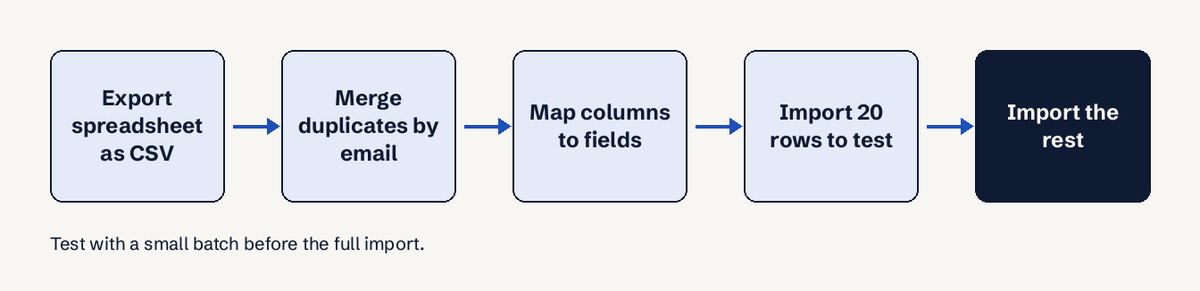
Every tool on this list imports a CSV file. The steps are the same everywhere:
- Export your sheet as CSV with one row per person and a header row.
- Clean it: one column per field (first name, last name, email, phone, company, city), phone numbers with country codes such as +91 or +44, and no merged cells.
- Remove duplicates by email address before you import, not after.
- Map each column to the tool's field during import; create custom fields only for data you will actually filter on.
- Import 20 rows first, check them on screen, then import the rest.
In LuckPanda you can also skip the import for active clients: typing a client's name on your next quote or invoice creates the record with the details on that document.
Contact management vs CRM: which do I need?
Contact management is the address book part: names, companies, phone numbers, notes and history. A CRM adds what you do with those contacts: leads, a pipeline of deals, follow-up tasks and reports. Most small businesses start needing contact management and grow into CRM features within a year, so pick a tool that has both and lets you ignore the second half until you need it.
| Need | Contact management is enough | You need a CRM |
|---|---|---|
| Find a client's phone number | Yes | |
| Know what a client owes | Only if linked to invoices | Yes |
| Track deals by stage | Yes | |
| Capture website enquiries | Yes |
How much does contact management software cost?
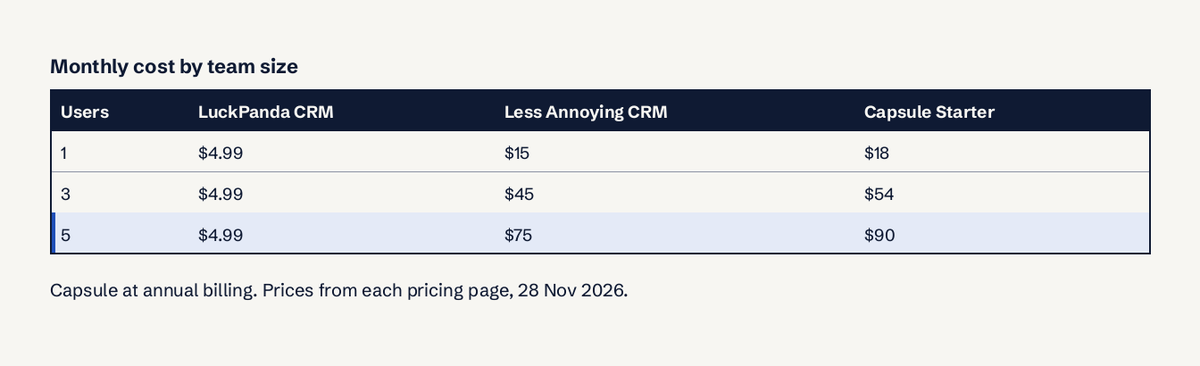
For a team of three, from the prices above: LuckPanda CRM $4.99 a month in total, Bigin Express $21, Less Annoying CRM $45, Capsule Starter $54 (annual billing), and Bitrix24 Basic $49 for up to five users. HubSpot and Zoho are free at that size within their contact and user limits.
How to choose
- You quote and invoice clients: pick LuckPanda CRM, because contacts, documents and balances are one record and the price is flat. See pricing.
- You need email logging for a sales team: HubSpot free (2 users) or Capsule Growth.
- You want the cheapest per-user paid plan: Bigin Express at $7.
- You want simplicity and phone support: Less Annoying CRM.
- You still use a sheet: our Google Sheets CRM template is a fine bridge until two people edit it at once.
Questions
What is the best contact management software for a small business?
For a business that sends quotes and invoices, LuckPanda CRM, because each contact is linked to their documents and what they owe, and it costs $4.99 a month per module rather than per user. For a free sales address book, HubSpot (2 users, 1,000 contacts) or Zoho CRM (3 users).
Is there free contact management software?
Yes. LuckPanda lets you keep clients free; HubSpot's free CRM covers 2 users and 1,000 contacts; Zoho CRM is free for 3 users; Capsule is free for 2 users and 250 contacts; Bigin is free for 1 user and 500 records; Bitrix24 is free for 1-2 users.
Contact management vs CRM: which do I need?
Contact management stores who people are and what you discussed. A CRM adds leads, deal stages and follow-ups. If you only look up details, contact management is enough; once you chase deals or need to know who owes you, you need a CRM.
How much does contact management software cost?
From $0 on free plans to about $7-$18 per user per month for small-business paid plans. LuckPanda CRM is $4.99 a month (₹199 in India) for the whole business, not per user.
Can I just use a spreadsheet?
For one person and a few dozen clients, yes. It breaks when several people edit it, when you need history per client, or when you need to see unpaid invoices next to the contact.
Ready to move your clients out of the spreadsheet? Start free with LuckPanda CRM and make your first invoice for one of them.