 luckpanda
Inventory List Template: 12 Free Templates and the Columns Every List Needs
An inventory list template needs SKU, name, unit, quantity, location, unit cost, value and reorder level. 12 free templates and how to keep one current.
On this page
- What should an inventory list include?
- Which extra columns does each business type need?
- Free inventory list templates by kind
- Spreadsheet templates (Excel and Google Sheets)
- Database and workspace templates
- Templates from your sales tool
- Which template should you start with?
- How do I keep an inventory list up to date?
- Is an inventory list required for tax?
- When should you switch from a spreadsheet to inventory software?
TL;DR: A good inventory list template has eight columns: item ID or SKU, name, unit, quantity on hand, location, unit cost, total value and reorder level. Below are 12 free templates for Excel, Google Sheets, Airtable and Notion, sorted by business type, plus a column layout you can copy. LuckPanda keeps your items, vendors and clients in one place today, and its Inventory module (items, warehouses and stock movements) is being built to replace the spreadsheet once you outgrow it.
Draft quotes, invoices and purchase orders for free on LuckPanda, no account needed. See what the Inventory module will do on the Inventory page.
An inventory list template is a ready-made spreadsheet with the columns you need to record what you hold, how much of it, where it is and what it is worth. The quickest free options are Microsoft's "Inventory list with reorder highlighting" for Excel, Smartsheet's simple inventory list for Excel or Google Sheets, and Airtable's inventory tracking template if several people update stock. Pick the one built for your kind of stock (retail, restaurant, office supplies, equipment, chemicals), add the eight core columns if any are missing, and log every stock change as a dated line instead of overwriting the quantity.
What should an inventory list include?
An inventory list should include one row per item and these columns, in this order:
| Column | What goes in it | Example |
|---|---|---|
| Item ID / SKU | Your own unique code | TSH-BLK-M |
| Item name | What staff call it | T-shirt, black, medium |
| Unit | How you count it | piece, kg, box of 12 |
| Quantity on hand | Units counted today | 48 |
| Location | Shelf, store or warehouse | Shop, rack B2 |
| Unit cost | What you paid per unit | 210.00 |
| Total value | Quantity x unit cost | 10,080.00 |
| Reorder level | Quantity that triggers a reorder | 20 |
| Vendor | Who you buy it from | Supplier name |
| Last counted | Date of the last count | 2026-11-28 |
Add a tax column if you invoice with tax codes. Indian GST invoices need an HSN or SAC code per item, which you can look up with our free HSN code finder. Chemical stock needs more: Smartsheet's chemical template adds Substance Name, Concentration, CAS Number and Hazard Class.
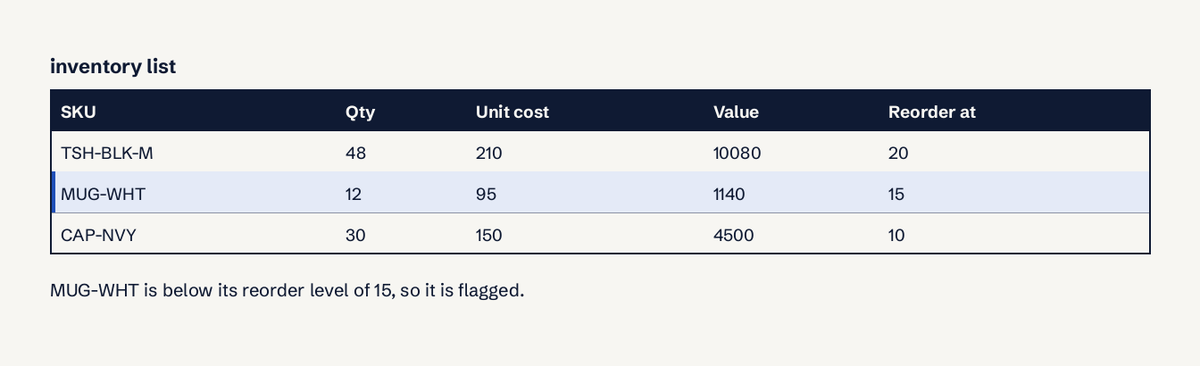
Set the reorder level from usage, not a guess: reorder level = daily usage x supplier lead time in days + safety stock. The mugs above sell 3 per day, the supplier takes 4 days to deliver and you keep 3 spare, so 3 per day x 4 days + 3 = 15. If the lead time grows to 6 days, the level becomes 3 per day x 6 days + 3 = 21.
Two formulas do most of the work. Total value is quantity times unit cost (in Excel or Google Sheets, =D2*F2 if quantity is in column D and cost in column F). A reorder flag is =IF(D2<=H2,"REORDER","") with the reorder level in column H, and conditional formatting can colour that row red. Google documents conditional formatting in its Sheets help.
Which extra columns does each business type need?
The eight core columns fit any business. Each kind of stock then needs two or three of its own:
| Business type | Extra columns | Why |
|---|---|---|
| Retail and online store | Barcode (UPC is 12 digits, EAN-13 is 13), variant (size, colour), selling price | Scanning at the till and per-variant counts |
| Restaurant and bar | Par level, case size, unit of measure (kg, litre, bottle) | Kitchens order by case but use by weight |
| Office supplies | Department, monthly usage | Shows who consumes what |
| Equipment and assets | Serial number, purchase date, warranty end date, condition | Audits and insurance claims |
| Manufacturing | Raw material or finished good, batch or lot number, expiry date | FIFO picking and recalls |
| Chemicals and labs | CAS number, hazard class, concentration, SDS link | Safety rules |
A worked example for a small clothing shop with 3 items: 48 black T-shirts at ₹210 (₹10,080), 12 white mugs at ₹95 (₹1,140) and 30 navy caps at ₹150 (₹4,500) give a total stock value of ₹15,720. With a reorder level of 15, only the mugs are flagged. Use the same row structure for 300 items; a spreadsheet stays usable up to a few thousand rows, but it slows down long before that if every quantity is a SUMIF over a long movement sheet.
Free inventory list templates by kind
Spreadsheet templates (Excel and Google Sheets)
- Microsoft Create: Inventory list with reorder highlighting: free Excel template that highlights items due for reorder. Best for a single shop that already uses Excel.
- Microsoft Create: Inventory list: the plain version, without reorder logic. Good when you only need a value total.
- Smartsheet: Free inventory list templates: simple, printable, office supply, restaurant, home, classroom, equipment, chemical, clothing, business and grocery lists, most in both Excel and Google Sheets. The widest choice by business type in one place.
- Google Sheets template gallery: free and shared by default, so two people can count at once. Use it when your team works from phones.
- HubSpot: inventory list templates: its inventory analysis template has ID, name, unit cost, quantity, value, serial number and condition columns, in Excel, Google Sheets and PDF. Free with an email sign-up.
- Template.net: inventory templates: many printable and industry-specific layouts. Some are free, some need a paid plan.
Database and workspace templates
- Airtable: Inventory tracking template: free template with linked records for products and manufacturers. Best when stock is shared across a team and you want filtered views.
- Asana: Inventory template: suggests fields for quantity, storage location, cost per unit, total value, reorder threshold and item status. Fits teams that already plan work in Asana.
- Notion: inventory management templates: community templates, many free. Good for small catalogues with photos and notes.
- SafetyCulture: inventory templates: checklist-style counts you can run on a phone. Best for periodic stock takes, not running totals.
Templates from your sales tool
- Shopify inventory export: export All products as CSV to get SKUs, names, variants, stock levels and prices, then open it in Excel or Sheets. The fastest start if you already sell on Shopify.
- Our own bar inventory template: for bars and restaurants that count bottles and partial measures.
Which template should you start with?
| Your situation | Start with |
|---|---|
| One shop, Excel user | Microsoft reorder highlighting template |
| Team counting on phones | Google Sheets or Airtable |
| Restaurant or bar | Smartsheet restaurant list or our bar template |
| Equipment or assets | Smartsheet equipment list or HubSpot (serial numbers) |
| Chemicals or labs | Smartsheet chemical list |
| Online store | Your platform's product export |
Start here if you are new to this: download the Microsoft reorder template, rename its columns to match the table above, enter today's count, and set a reorder level for your 20 fastest sellers first.
How do I keep an inventory list up to date?
Keep an inventory list up to date by recording every change as a movement, not by typing over the quantity. A second sheet called "movements" with date, SKU, quantity in or out, reason (purchase, sale, return, damage, count adjustment) and document number keeps the history. The quantity on hand becomes a SUMIF of those movements, so you can always say why a number changed.
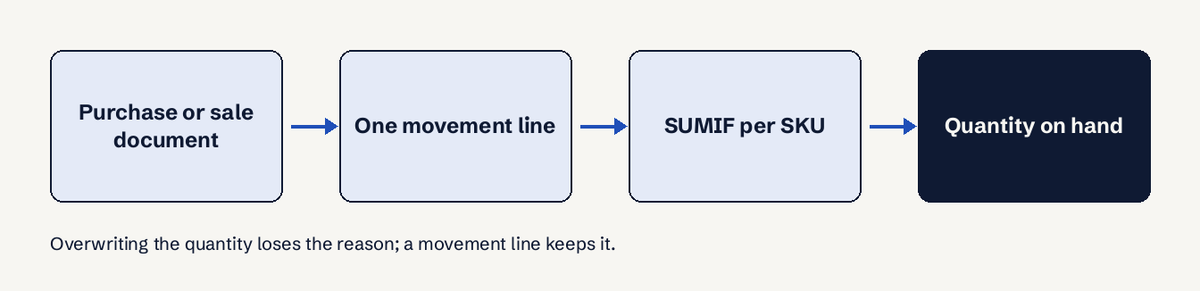
Then count on a schedule. Count your fastest-moving items every 7 days and everything else every 30 to 90 days. A common split is ABC: the roughly 20% of items that bring most of your sales get the weekly count. Record any difference between the count and the sheet as an adjustment line with the reason, never as a silent edit. Our guides on the best ways to track inventory and how to calculate ending inventory go further.
Is an inventory list required for tax?
Often, yes, for tax. The IRS says in Publication 538 that if you produce, purchase or sell merchandise you generally must keep an inventory, with an exception for small business taxpayers that meet the gross receipts test ($26 million or less in average annual gross receipts over the 3 prior tax years, indexed for inflation). In India, rule 56(2) of the CGST Rules (CBIC GST Acts and Rules) requires a registered person, other than one under the composition scheme, to keep stock accounts showing opening balance, receipts, supplies, goods lost, stolen, destroyed, written off or given as gifts or free samples, and the closing balance. This is information, not tax advice.
When should you switch from a spreadsheet to inventory software?
Switch when the spreadsheet stops matching the shelf. Typical signs: stock in more than one location, more than one person editing, quantities that need to change when you issue an invoice or receive a purchase order, or a count that never reconciles.
LuckPanda is built for that step. Today you can draft quotes, invoices and purchase orders free and keep clients, vendors and items in your business. The Inventory module is being built: items will hold a name, unit, sale price, purchase price, tax rate and HSN or SAC code; warehouses will show stock per item per location; and every receipt, delivery, transfer and adjustment will be a stock movement linked to the document that caused it. It is priced per module, not per user: ₹199 per month in India or $4.99 per month elsewhere, with 25% off for annual billing (pricing). It is not a full warehouse management system: bin optimisation, pick routes and scanners are not planned for the first version. Until it ships, a spreadsheet with a movement log is the honest answer.
Questions
What should an inventory list include?
At minimum: item ID or SKU, item name, unit, quantity on hand, location, unit cost, total value and reorder level. Add vendor, last counted date and a tax code (HSN or SAC in India) when you need them.
Is there a free inventory list template in Excel or Google Sheets?
Yes. Microsoft Create has a free Excel inventory list with reorder highlighting, Smartsheet has free lists in Excel and Google Sheets by business type, and the Google Sheets template gallery is free with a Google account.
How do I keep an inventory list up to date?
Log each change as a dated movement with a reason and document number, calculate quantity on hand from those movements, and count stock on a schedule, recording differences as adjustments.
When should I switch from a spreadsheet to inventory software?
When you hold stock in several places, several people edit the list, or stock must change automatically with invoices and purchase orders. Until then, a well-built spreadsheet is enough.
How do I make a simple inventory list?
Open a blank sheet, add the eight core columns, enter one row per item from a physical count, add the total value and reorder formulas, and save it as your template.
Ready to move past the spreadsheet? Start free on LuckPanda and follow the Inventory module as it ships.