 luckpanda
Chatbot Marketing: How to Turn Website Chats Into Sales
Chatbot marketing uses a website chatbot to answer buyers, qualify them with two or three questions and suggest one next step. Here is how to set it up.
On this page
- Website bots vs social DM bots
- How do chatbots help marketing?
- What you need before you start
- How to use chatbots for marketing: 8 steps
- What questions should a marketing chatbot ask?
- How do you measure chatbot marketing?
- Can chat transcripts improve marketing copy?
- Which tools fit which kind of chatbot marketing?
- Common mistakes
TL;DR: Chatbot marketing means using a chatbot on your website to do three jobs a good salesperson does: answer the buyer's question, ask two or three questions to understand what they need, and suggest one clear next step. The chats it saves are also the best marketing research you will get, because buyers write their doubts in their own words.
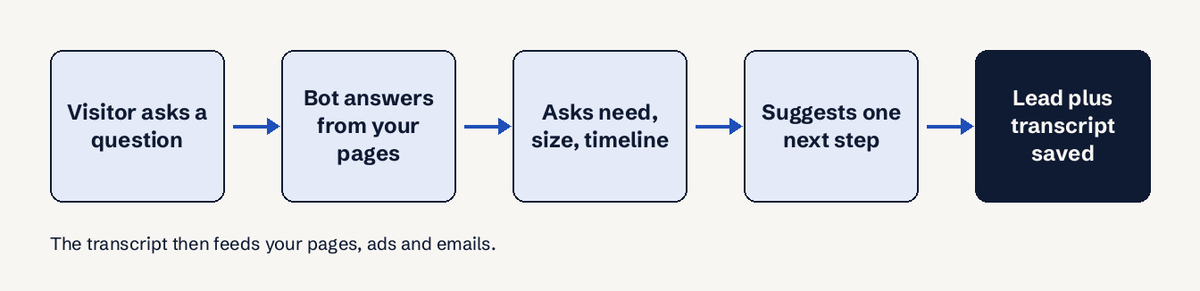
Chatbot marketing is the use of a chatbot, usually on your own website, to turn visitors into leads and customers. Salesforce defines it as automating customer interactions on websites or messaging apps "with the ultimate goal of generating leads, promoting sales, and providing valuable support". In practice, the chatbots for marketing that earn their place do three things in order: answer from your real pages, qualify with a short set of questions (need, size, timeline), and offer one next step such as a quote, a demo or a product page. Then you read the transcripts every week and feed the questions and objections back into your pages, ads and emails. This guide covers how to use chatbots for marketing step by step, what to ask, how to measure it and the rules on bot disclosure that now apply in the EU and California.
Website bots vs social DM bots
There are two common kinds of marketing chatbot, and they suit different businesses:
- Website chatbots that sit on your pricing, product and contact pages and talk to people who are already considering you. This is where conversational marketing works best for small businesses, because the visitor arrived with intent.
- Social and messaging bots (Messenger, Instagram DMs) that run campaigns, giveaways and keyword replies. Tools such as ManyChat are built for this; Warmly's 2026 roundup lists ManyChat as free for 1,000 contacts with Pro from $15 a month.
This guide is about the first kind: a conversational marketing chatbot on your own site.
How do chatbots help marketing?
Chatbots help marketing in four concrete ways:
- They answer at the moment of doubt. A visitor on a pricing page at 11 p.m. with one question either gets an answer in under 10 seconds or leaves. A form promises a reply in 24 hours.
- They qualify without a long form. Two or three questions inside a conversation feel like help, not paperwork.
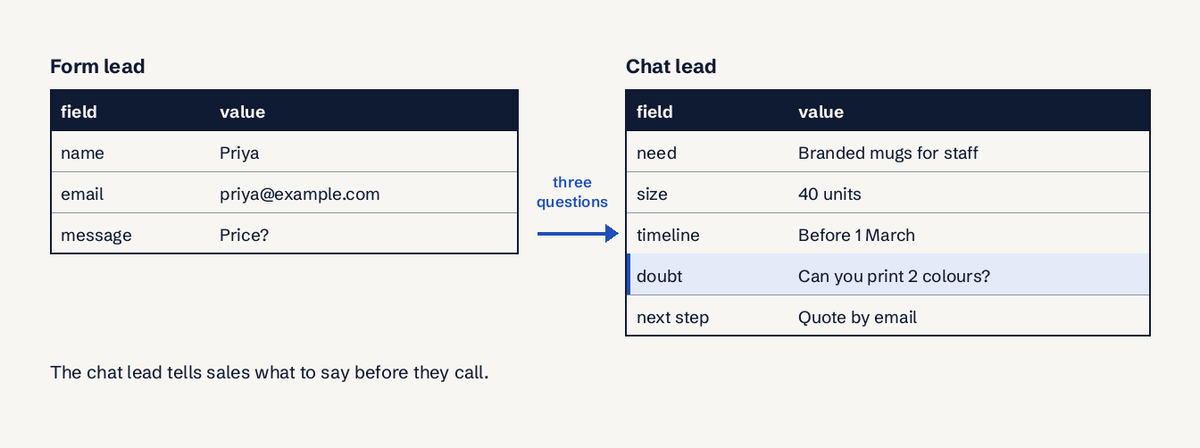
- They hand you context. A lead that arrives with "needs 40 units, wants delivery before March, comparing two suppliers" is easier to close than a name and an email.
- They record the buyer's language. Every question, objection and missing feature is saved word for word. That is copy research you would otherwise pay for with surveys and interviews.
What chatbots do not do: create demand. A chatbot converts traffic you already have. If your site gets 30 visitors a month, fix traffic first.
What you need before you start
- Your 20 most common pre-sale questions, collected from email, calls, DMs and sales notes: price, delivery time, minimum order, payment methods, refunds, what is included.
- Written answers on your site for each of them. A chatbot can only answer from what exists. Publish numbers ("14-day refund", "ships in 3 working days", "minimum order 25 units"), not "a short period".
- One next step per page type. Pricing page: start a trial or get a quote. Product page: see sizes or book a call. Contact page: leave details for a call back.
- A place for leads to land: a CRM, or at least a shared inbox someone reads every day.
- Analytics that can record a lead as a conversion (in GA4 the recommended event is generate_lead).
How to use chatbots for marketing: 8 steps
- Pick the pages that sell. Put the chatbot on 4 page types first: pricing, product, comparison and contact. These visitors are already deciding. Setting: show the widget on all pages, but write page-specific greetings for these four.
- Write a greeting that asks, not sells. Use "Hi, what are you looking for today?" or, on a pricing page, "Questions about plans or pricing? Ask me." Avoid "How are you?": the Nielsen Norman Group chat study watched a user delete her typed question to answer that pleasantry.
- Say it is a bot. State it in the first message: "I'm an AI assistant for Acme. A person can take over." Under Article 50 of the EU AI Act, from 2 August 2026 an AI system that talks to people must tell them so at the latest at the first interaction, unless it is obvious. California's bot law (Business and Professions Code 17941) has, since 1 July 2019, made it unlawful to hide a bot's artificial identity to encourage a sale.
- Answer from your own pages only. Load your site pages, price list, FAQ and policies into the bot. Configure it to say "I don't have that, want me to pass you to a person?" rather than guess. A wrong price quoted by a bot is a marketing problem you created.
- Ask at most three qualifying questions. Ask them only after you have answered the visitor's first question. The three that matter for most small businesses are below.
- Ask for contact details only when the visitor wants something. A quote, a call back, a sample, a reply after hours. Asking for an email before answering anything loses the people who only wanted an answer, and those are often tomorrow's buyers.
- Suggest one next step. One, not a menu: "Based on 40 units a month, the Pro plan fits. Want me to send the quote to your email?" Then hand the lead, with a summary, to the person who will follow up.
- Review transcripts every week. Read every chat that ended without a next step. Group them: missing answer, objection, product gap. Fix the page, write the FAQ, brief the ad. This is the step that turns a chat widget into a marketing channel.
What questions should a marketing chatbot ask?
A marketing chatbot should ask about need, size and timeline, in plain words, one at a time:
| Question | Why it matters | Example wording |
|---|---|---|
| Need | Lets the bot recommend the right product or plan | "What are you hoping to get done?" |
| Size | Separates a small order from a big account | "Roughly how many units (or people) is this for?" |
| Timeline | Tells sales who to call first | "When do you need it by?" |
| Contact (only on request) | Needed to send a quote or call back | "Where should I send the quote?" |
| Budget (optional, B2B) | Use only if price varies a lot by tier | "Do you have a budget range in mind?" |
Stop at 3 questions plus contact. Each extra question costs you conversations. If you need more details, the person who follows up can ask them with the lead summary in hand.
For copy-ready wording by scenario, see our chatbot script examples, and for when the bot should open on its own, our guide to live chat triggers.
How do you measure chatbot marketing?
Measure chatbot marketing by what it sells, not by how many chats it has. Track these every 30 days:
- Chat start rate: chats started divided by visitors on the pages with the bot.
- Answer rate: chats where the bot answered without saying "I don't have that". A low rate means your pages are missing answers.
- Lead rate (target it per page, not sitewide): chats that ended with contact details or a booked next step, divided by chats started.
- Lead to customer rate: of those leads, how many bought. Compare it with form leads from the same pages.
- Unanswered and requested topics: the count of distinct people who asked for something you do not offer or do not explain.
Worked example: 2,000 visitors on pricing and product pages, 120 chats started (6% start rate), 30 leads (25% of chats), 6 customers (20% of leads). If form leads from the same pages close at 10%, the chat leads are worth twice as much each, and that is the number to show whoever pays for the tool. In GA4, fire generate_lead when the bot collects contact details and mark it as a key event (Google renamed conversions to key events in March 2024).
Our live chat best practices guide covers the service side of the same chats: hours, wait times and handoff.
Can chat transcripts improve marketing copy?
Yes, and this is the part most chatbot marketing guides skip. A transcript records exactly how a buyer describes their problem, what they doubted and what they wanted that you do not sell. That is the raw material for:
- Headlines and ads: if 15 of 120 chatters this month typed "do you ship to Dubai", that phrase belongs on the product page and in the ad.
- FAQ pages: every question the bot could not answer is a missing FAQ entry.
- Objection handling: repeated doubts ("is there a contract?") go into the pricing page, in the buyer's words.
- Product decisions: requests for things you do not offer, ranked by how many different people asked, tell you what to build or stock next.
A simple routine: every Monday, export the last 7 days of chats, tag each with one of 4 labels ("answered", "missing answer", "objection", "request"), and fix the top 3 by count. Reading 30 chats in 10 minutes usually beats a survey, because nobody was prompted.
Which tools fit which kind of chatbot marketing?
Pick by where your buyers talk to you:
- Social campaigns and DM automation: ManyChat (free tier for 1,000 contacts, Pro from $15 a month per Warmly's 2026 roundup).
- Enterprise B2B with account-based plays: tools like Warmly, priced from $10,000 a year in the same roundup, or Intercom's Fin, which Intercom's help centre lists at $0.99 per resolution and $9.99 per qualification.
- Small businesses that want a sales chatbot on their own site: a bot that reads your pages and hands you leads with a summary.
That last case is what LuckPanda Chatbot does: paste your website address and it builds a chatbot that answers only from your pages and documents, asks at most two or three short questions, asks for contact details only once a visitor wants something and suggests one next step. Every chat is saved word for word, leads arrive with need, timeline and size, and requests for things you do not offer are ranked on a Requests board. You can try it without an account (the preview is kept for 7 days); putting it on your site costs $4.99 a month for up to 10 websites (₹199 in India). See pricing.
Common mistakes
- A pop-up that opens in the first second on every page. It reads as an ad. Open it on intent signals instead: 30 seconds on the pricing page, 50% scroll depth, or a second visit.
- A bot that guesses. If it is not on your site, the bot should say so and offer a person.
- A lead form disguised as a chat. Five questions in a row before any answer is a form with extra steps.
- Nobody reads the transcripts. The bot keeps working, the insight goes unused.
- No handoff. A buyer ready to pay who cannot reach a person is the most expensive lost chat. During business hours, aim for a person to reply within 2 minutes of a handoff; after hours, say when someone will reply (for example within 12 hours). See our guide to ecommerce live chat for handoff on stores.
Questions
What is chatbot marketing?
Chatbot marketing is using a chatbot to talk to prospects and turn them into leads and customers, usually on your website or in messaging apps. A good marketing chatbot answers the visitor's question, asks two or three qualifying questions and suggests one next step.
Are chatbots good for marketing?
Chatbots are good for marketing when your site already has traffic and your answers are written down. They convert existing visitors and collect buyer language; they do not create demand on their own.
What is the difference between a marketing chatbot and a support chatbot?
A support chatbot aims to resolve a problem fast and close the conversation. A marketing chatbot aims to move a buyer toward a purchase: it qualifies, recommends and hands a lead to sales.
Do I have to tell visitors they are talking to a bot?
In the EU, yes: Article 50 of the AI Act requires it from 2 August 2026, at the latest at the first interaction, unless it is obvious. In California, hiding a bot's identity to encourage a sale is unlawful under Business and Professions Code 17941. Disclosing it everywhere is the simple rule.
What is conversational marketing?
Conversational marketing is marketing through one-to-one, real-time conversations (chat, messaging) instead of forms and one-way messages. A conversational marketing chatbot is the automated part of it, with a person taking over when needed.
How much does a marketing chatbot cost?
Prices range from free tiers to five figures a year. Per the 2026 figures cited above, ManyChat Pro starts at $15 a month, Warmly from $10,000 a year, and Intercom Fin charges per outcome. Compare what you pay per lead, not per seat.