 luckpanda
Chat Bot Scripts: 12 Copy-Ready Examples for AI Chatbots
Chat bot scripts are the lines your bot says at each step. Copy 12 examples for greeting, qualifying, next step, handoff and "I don't know".
On this page
- What is a chatbot script?
- Is it a legal requirement to say it is a bot?
- 1. Greeting for a sales page
- 2. Greeting for a support or help page
- 3. Answer first, then one question
- 4. Two qualifying questions for a lead
- 5. Asking for contact details at the right moment
- 6. One clear next step
- 7. "I don't know" (the answer is not in your content)
- 8. Reprompt when the bot did not understand
- 9. Handoff to a person
- 10. After hours
- 11. Objection: "It's too expensive"
- 12. Closing and feedback
- Which script should you use?
- How to put the 12 examples together
- Where these scripts run
TL;DR: A chat bot script is the set of lines and rules a chatbot follows at each moment of a conversation: the greeting, the questions, the answer, the next step and the handoff. For an AI chatbot you do not script every reply; you script the moments that decide a sale or lose one. Below are 12 chat bot script examples you can copy, each with when to use it and how to adapt it.
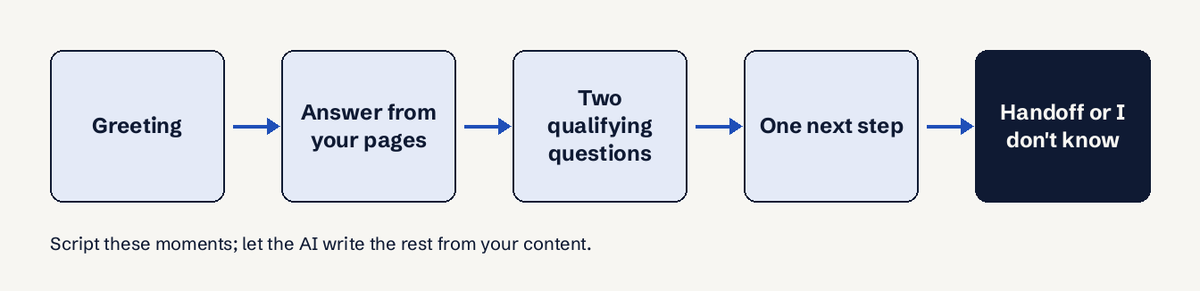
A chatbot script used to mean a decision tree: button A leads to message B. Modern AI chatbots answer free text from your own pages, so the script that matters now is shorter and sharper. It covers six moments: open the chat, answer, qualify with at most two or three questions, suggest one next step, admit when it does not know, and hand the chat to a person. Get those six right and the bot sells; get them wrong and it either interrogates visitors or invents answers.
What is a chatbot script?
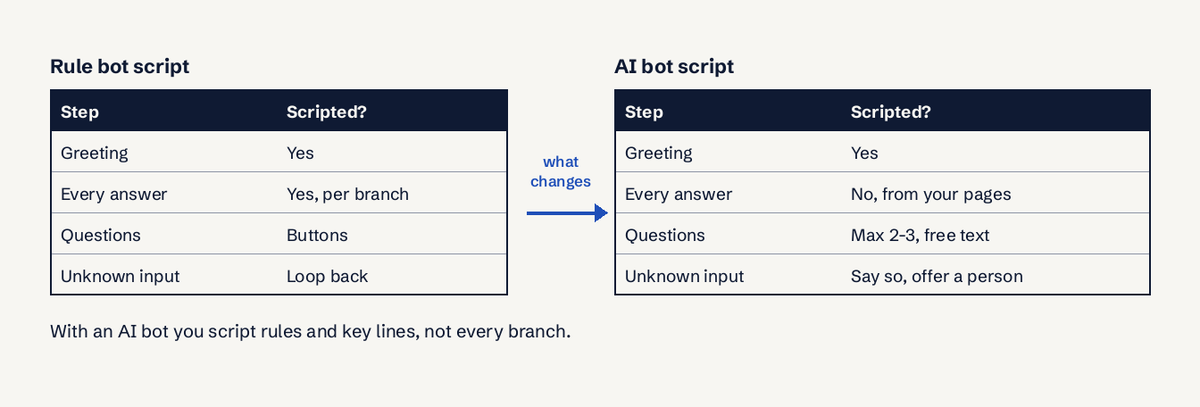
A chatbot script is the written plan for what a bot says and does at each step of a conversation, including the exact wording of fixed messages and the rules for when to ask, answer, or pass the chat on. Rule-based bots need a script for every branch. AI bots need a script for the moments with business consequences: the first line, the qualifying questions, the ask for contact details, the fallback and the handoff.
Two public guides set the floor for any script. Nielsen Norman Group's chatbot research says to be upfront that the visitor is talking to a bot, say clearly what it can do, and be honest about not understanding, with an escape hatch to a human (NN/g, The User Experience of Chatbots). Google's conversation design guidance on errors adds: never repeat the original prompt word for word on a retry, and be transparent about why something did not work (Google conversation design: errors).
Is it a legal requirement to say it is a bot?
In some places, yes. Article 50(1) of the EU AI Act requires that people are told they are interacting with an AI system unless that is obvious, and Article 50(5) says this must happen at the latest at the first interaction. Article 50 applies from 2 August 2026 (EU AI Act, Article 50). In California, SB 1001 (Business and Professions Code 17940-17943, in force since 1 July 2019) makes it unlawful to use an undisclosed bot to mislead someone in order to encourage a sale (SB 1001). This is information, not legal advice. The practical answer: put "AI assistant" in the greeting, as every script below does.
1. Greeting for a sales page
Scenario: visitor lands on a pricing or product page.
Hi, I'm the AI assistant for Bright Tiles. I can answer questions about our tiles, sizes, prices on this site and delivery. What are you working on?
What it does: discloses the bot, names what it can answer, and opens with a question about the visitor's project instead of "How can I help?". Adapt it: replace the three topics with the three things buyers ask most on that page. Keep it under 30 words. Timing: open it after 20 s on a pricing page or 50% scroll, not on page load.
2. Greeting for a support or help page
Scenario: visitor is on a help, order or returns page.
Hi, I'm an AI assistant. I can answer from our help pages, like returns, delivery times and setup. If you need a person, just say so and I'll pass this chat on.
What it does: sets the handoff expectation in the first line, which NN/g recommends as an escape hatch. Adapt it: list your top three support topics. If no one answers chats on weekends, say when a person replies. Timing: do not pop it open on help pages; let the visitor click. Help-page visitors already know what they want.
3. Answer first, then one question
Scenario: the visitor asks a direct question ("Do you ship to Pune?").
Yes, we deliver to Pune in 3 to 5 days, and delivery is free above Rs 2,000 per order. Is this for a home project or a shop fit-out?
What it does: answers fully in the first sentence, then asks one qualifying question. Never answer a question with a question. Adapt it: the facts in the answer must come from your own pages. The bot should only state what your content says.
4. Two qualifying questions for a lead
Scenario: the visitor shows buying intent ("I need tiles for a 3BHK").
Got it. Two quick questions so I point you to the right range: roughly how many square feet, and when do you want to start?
What it does: asks for size and timeline in one message. Two or three short questions is enough; more feels like a form. Adapt it: pick the two questions your sales team always asks first. Size and timeline work for most businesses; budget is the third, and optional.
5. Asking for contact details at the right moment
Scenario: the visitor wants something only a person can give: a quote, a visit, a callback.
I can have our team send you a quote for about 1,200 sq ft starting in 30 days. What's the best email or phone number for that?
What it does: asks for contact details only after the visitor asked for something, and repeats their need back so the ask is clearly useful to them. Adapt it: never open with "Enter your email to continue". Gate the ask behind a concrete request, and send the lead to sales within 60 minutes while the visitor still remembers you.
6. One clear next step
Scenario: the visitor's question is answered and they are not ready to talk to sales.
Based on what you said, the Matte Stone range fits a 3BHK floor best. You can see sizes and prices here: /tiles/matte-stone. Want me to check stock for your start date?
What it does: recommends one option and one link, not five. The closing question keeps the chat open without pushing. Adapt it: map your top visitor needs to one page each, and make sure those pages are in the bot's sources.
7. "I don't know" (the answer is not in your content)
Scenario: the visitor asks something your pages do not cover.
I don't have that in our information, so I won't guess. I can pass your question to the team and they'll reply by email. Want me to do that?
What it does: admits the gap, refuses to invent, and offers a person. This is the line that protects you from a bot making up a price or a policy. Adapt it: add the reply time you can actually meet, such as "within 24 hours". Then add the missing answer to your sources so the next visitor gets it.
8. Reprompt when the bot did not understand
Scenario: the message is unclear ("the blue one?").
Sorry, which product do you mean? You can paste the link or tell me the name.
What it does: a short apology and a condensed version of the question, as Google's error guidance recommends, with an easy way to answer. Adapt it: on a second miss, offer the handoff (script 9) instead of asking a third time. Keep the reprompt under 15 words, about 5 s to read.
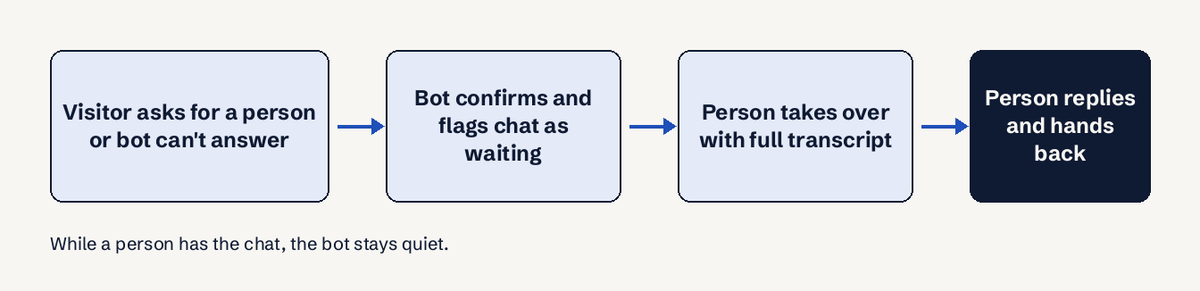
9. Handoff to a person
Scenario: the visitor asks for a human, is upset, or the question needs judgement (a refund exception, a custom order).
I'll bring in someone from our team now. They can see this whole chat, so you won't need to repeat yourself. If no one replies in 5 minutes, we'll email you at the address you gave.
What it does: confirms the handoff, promises context carries over, and sets a fallback. Adapt it: only promise 5 minutes if someone watches chats live. Otherwise give real hours, for example "within 4 hours on working days".
10. After hours
Scenario: a visitor writes at 11 p.m. and wants a person.
Our team is offline until 10 a.m. IST. I can answer from our site now, or take your question and email address so they reply first thing tomorrow.
What it does: stays useful when no one is there, and turns the visit into a lead instead of a closed tab. Adapt it: use your real hours and time zone, and reply to after-hours leads within 24 hours; a quote sent 3 days later goes to a competitor.
11. Objection: "It's too expensive"
Scenario: the visitor pushes back on price.
That's fair to check. The price on this page includes delivery and the 10-year warranty, and the price is per box of 1.44 sq m. If budget is tight, the Classic range starts lower. Want me to compare the two for your size?
What it does: acknowledges, adds facts that are on your pages, and offers a cheaper option. No fake discounts, no pressure. Adapt it: only state inclusions and alternatives your content lists. For more phrasings, the free objection handling generator drafts replies to paste into your sources.
12. Closing and feedback
Scenario: the visitor says thanks or goes quiet.
Glad I could help. If anything was missing from our site, tell me and I'll pass it on.
What it does: ends politely and asks what was missing, which is how you learn what buyers want that you do not offer. Adapt it: read those answers every 7 days. They are your cheapest product research.
Which script should you use?
| Moment | Script | Rule of thumb |
|---|---|---|
| First message on a sales page | 1 | Disclose the bot, name 3 topics, ask about their project |
| First message on a help page | 2 | Promise a person is available |
| Direct question | 3 | Answer in the first sentence |
| Buying intent | 4 | Two questions: size and timeline |
| They want a quote or call | 5 | Ask for contact details only now |
| Answered, not ready | 6 | One recommendation, one link |
| Not in your content | 7 | Say so, never guess, offer a person |
| Unclear message | 8 | Short apology, condensed question |
| Upset or needs judgement | 9 | Hand off with full context |
| Nobody online | 10 | Answer now, collect for tomorrow |
| Price pushback | 11 | Facts from your pages, a cheaper option |
| End of chat | 12 | Ask what was missing |
How to put the 12 examples together
Build the set as rules plus a few fixed lines, not a full dialogue tree. The AI writes most replies from your content; your script controls tone and the moments that matter.
- List the 10 questions visitors ask most (from emails, calls and past chats) and make sure the answers are on your pages or in an FAQ the bot reads.
- Write the greeting (script 1 or 2) with the bot disclosure.
- Pick your two qualifying questions (script 4).
- Decide the one next step per visitor need (script 6) and the moment you ask for contact details (script 5).
- Write the "I don't know" and handoff lines (scripts 7 and 9) with reply times you can keep.
- Test it with 20 real questions over 2 days, including ones your content does not answer, and fix the gaps.
Where these scripts run
You can paste these lines into most website chatbots: Tidio, Chatbase, Crisp and others all let you edit the greeting and fallback messages. If you want a bot that already follows this pattern, LuckPanda Chatbot answers only from your pages and documents, asks at most two or three short questions, asks for contact details only once a visitor wants something, says so when the answer is not there and offers a person, and lets you take over a chat while the bot stays quiet. You can try a preview from your website address without an account (up to 30 pages and 20 questions, kept 7 days); putting it live costs $4.99 a month for up to 10 websites (pricing). For more on the lead side, see chatbot lead generation, and for the opening rules, our guide to live chat triggers and live chat best practices.
Questions
What is a chatbot script?
A chatbot script is the plan for what a bot says at each step of a conversation: fixed lines like the greeting and fallback, plus rules for when to ask questions, ask for contact details and hand off to a person.
What should a chatbot say when it does not know the answer?
It should say it does not have that information, refuse to guess, and offer to pass the question to a person, for example: "I don't have that in our information, so I won't guess. I can pass your question to the team." Then add the missing answer to its sources.
How many questions should a chatbot ask before asking for contact details?
Two, at most three, short questions, usually about size and timeline. Ask for an email or phone number only after the visitor asks for something a person must provide, such as a quote or a callback.
How should a chatbot hand a chat to a person?
Confirm the handoff, tell the visitor the person will see the full chat so they do not repeat themselves, and give a fallback if no one answers soon. The bot should stay silent while the person replies.
How do you write a chatbot script for an AI bot?
Script the fixed moments (greeting with bot disclosure, two qualifying questions, the contact-details ask, the "I don't know" line and the handoff) and let the AI answer everything else from your pages. Test with 20 real questions before going live.
Should a chatbot say it is a bot?
Yes. NN/g recommends it for trust, and the EU AI Act (Article 50, applying from 2 August 2026) requires telling people they are talking to an AI unless it is obvious. California's SB 1001 bans undisclosed bots used to encourage sales.
Are there free chatbot script templates?
Yes. The 12 scripts on this page are free to copy. For reply wording, LuckPanda's free canned responses library has ready lines for common support situations.