 luckpanda
Home Repair Estimate Template: 12 Free Picks and Cost Data
Free home repair estimate templates in PDF, Excel, Sheets and online, plus the cost data contractors price from.
On this page
TL;DR: The fastest free home repair estimate template is one you fill in online and download as a PDF: LuckPanda's free estimate generator does that with no account, with labour and materials on separate lines. If you prefer a file, Jobber (PDF, Excel), ArcSite (Google Sheets) and Microsoft Create (Word, Excel) all offer free downloads. Price the lines from your own job history first, then check them against RSMeans, Craftsman's National Construction Estimator or Homewyse.
Make a home repair estimate now, free and without an account: open the LuckPanda estimate generator.
A free home repair estimate template should give you your business details, the client, an estimate number and date, a scope of work, separate lines for labour, materials, equipment and disposal, tax, a total, how long the price stands, and what could change it. Below are 12 free templates and cost sources, grouped by kind, each with who it suits and what it costs, plus a start-here path if this is your first estimate.
How LuckPanda handles a home repair estimate
LuckPanda is a business operating system for small businesses, and its Sales module covers quotes, estimates, invoices and receipts. For a repair estimate it gives you:
- A free estimate generator at luckpanda.app/tools/estimate-generator: list labour and materials as separate lines, add terms, and totals and tax update as you type. No account is needed to draft or to download a branded PDF.
- Any currency, formatted by the document's country: a US job shows $1,610.00, an Indian job shows ₹1,51,984.00.
- AI assistant support: the page gives a prompt you can paste into ChatGPT, Claude, Gemini or Perplexity, and a public MCP server, so an assistant can open the estimate filled in for you to check. The assistant drafts; you decide what is sent.
- Paid only when you use the result: numbering, sending by email, share links, payment links and clean PDFs without LuckPanda branding need the Sales module, $4.99 a month (₹199 for a business in India), priced per module, not per user. See pricing.
What it does not do: LuckPanda has no built-in construction cost database or takeoff from drawings. You bring the rates; the sources below help you check them.
Trade-specific versions: painting estimate template, roofing estimate template, and the general estimate format for jobs where quantities are measured at the end.
What should a home repair estimate include?
A home repair estimate should include everything a client needs to accept the price and everything you need to defend it later:
- Your business name, address, phone, and licence number where your state requires it.
- Client name and the property address.
- Estimate number and date, and how long the price is valid (30 days is common).
- Scope of work: what you will repair, and what is excluded.
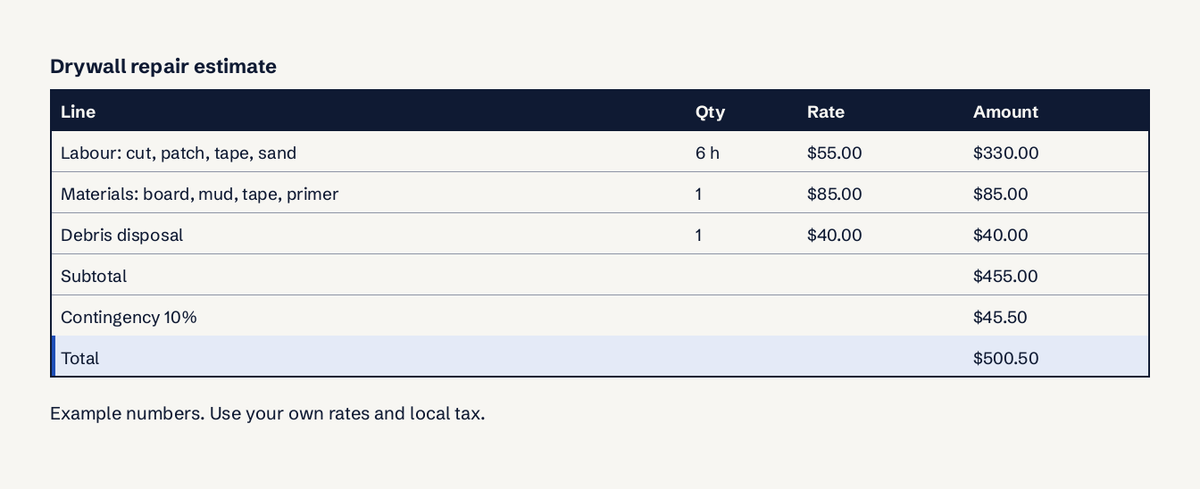
- Labour lines (hours x rate, for example 6 hours at $55 per hour), material lines (quantity x unit price), equipment, permits and disposal.
- Contingency or allowance lines, labelled as such.
- Subtotal, sales tax where it applies, total.
- Payment terms: deposit, progress payments, balance due.
- A line on what changes the price (hidden damage, client changes) and a signature space.
Free home repair estimate templates
These are the templates worth your time, starting with the one you can fill in and send today.
| Template | Format | Cost |
|---|---|---|
| LuckPanda estimate generator | Online, PDF | $0 to draft and download |
| Jobber | PDF, Excel, online | $0 |
| ArcSite | Google Sheets | $0 |
| Jotform | Online table | $0 |
| Invoicefly | Docs, Sheets, Excel, PDF | $0 |
| Microsoft Create | Word, Excel | $0 |
| improveit360 | Download | $0 |
- LuckPanda estimate generator: online, free, no account. Best for handymen and small repair firms who want a clean PDF in minutes and an upgrade path to numbering, sending and payment links.
- Jobber handyman estimate template: free PDF and Excel downloads, or a customise-online option that converts the estimate to an invoice. Good if you already lean toward field-service software.
- ArcSite House Repair Estimate Template: a Google Sheets download with labour, materials, equipment and markup lines and pre-built formulas, bundled with contract, proposal and invoice templates. Best for remodelers who want the paperwork set in one go.
- Jotform Home Repair Estimate Template: a free online table that tracks client details, equipment, material and labour costs per estimate. Best as a log of all your estimates rather than the document you send.
- Invoicefly handyman estimate templates: the same layout in Google Docs, Sheets, Excel and PDF. Useful when a client or partner insists on a specific file type.
- Microsoft Create estimate templates: free Word and Excel estimate layouts. Best if you work offline in Office.
- improveit360 home repair estimate guide and template: a downloadable template with a step-by-step method for scope, costs and margin. It also cites a 9.32% average net margin for home improvement firms in 2023 and 2024, a good reason not to underprice.
Where do contractors get cost data for estimates?
Contractors price first from their own past jobs, then check against published cost data. These are the sources that matter for repair work:
- RSMeans Data: construction cost data with localised pricing, sold as an online subscription with a free trial. Best for bigger remodels and insurance-adjacent work where a defensible number matters.
- Craftsman 2026 National Construction Estimator: the 74th annual edition, with material, labour and installed costs, manhours, crew sizes and equipment rates, also as a searchable PDF eBook. A low-cost book for a solo contractor.
- Homewyse: free job-specific estimates for repair and maintenance work with labour hours and price ranges for your area. Best for a quick sanity check on a single task.
- BLS wage data for general maintenance and repair workers: official US wage figures by state and metro area. Use it to check that your labour rate covers a fair wage plus overhead.
- HomeAdvisor cost guides: what homeowners are told a job typically costs. Read it to know the number your client has already seen.
Rules worth knowing before you send
- California CSLB contract payment rules: for home improvement work a down payment may not exceed $1,000 or 10% of the contract price, whichever is less. Put your deposit line within that.
- FTC Cooling-Off Rule, 16 CFR 429: a sale of $25 or more made at the buyer's home, or $130 or more at a temporary location, can generally be cancelled within 3 business days. If you sign jobs at the kitchen table, your contract needs the cancellation notice.
Is a home repair estimate legally binding?
Usually not on its own. An estimate is an approximate price; it becomes binding when the client accepts it and the terms become a contract, often by signing it or a separate agreement. Some states set rules for home improvement contracts, such as California's deposit limit above. Write "estimate valid for 30 days" and "price may change if hidden damage is found" on the document, and get a signed contract before work starts. This is general information, not legal advice; check your state's contractor board.
Start here: your first home repair estimate
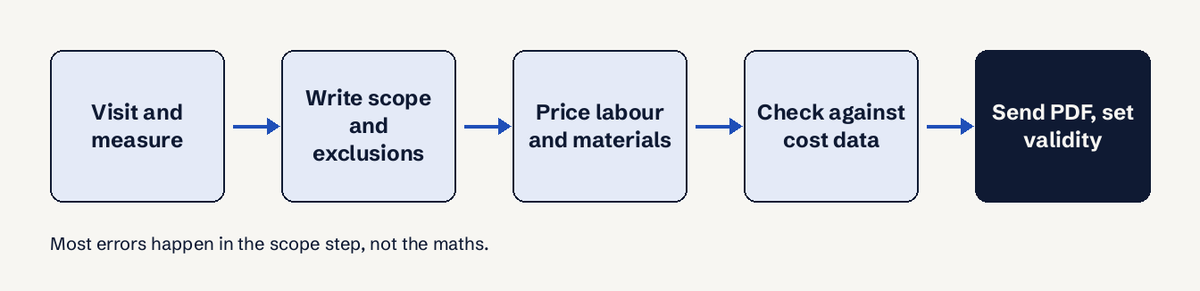
- Visit the property, photograph the damage, measure.
- Write the scope in plain words, including what you will not touch.
- Open the estimate generator and add labour and materials as separate lines, plus disposal and permits.
- Check one or two lines against Homewyse or the National Construction Estimator.
- Add a 10% contingency line if the wall or floor is not yet open, state that the price stands for 30 days, and download the PDF.
When the client says yes, the same document becomes your invoice; with the invoice generator you can bill without retyping lines.
Questions
Where can I get a free home repair estimate template?
LuckPanda's estimate generator is free online with no account and gives you a PDF. Jobber offers free PDF and Excel versions, ArcSite a Google Sheets version, Invoicefly Docs, Sheets, Excel and PDF, and Microsoft Create Word and Excel layouts.
What should a home repair estimate include?
Your details and licence number, client and property, estimate number and date, scope and exclusions, separate labour, material, equipment, permit and disposal lines, contingency, tax, total, payment terms, how long the price is valid, and a signature line.
Where do contractors get cost data for estimates?
From their own past jobs first, then RSMeans, Craftsman's National Construction Estimator, Homewyse for quick checks, and BLS wage data to confirm labour rates.
Is an estimate legally binding?
Generally not until the client accepts it and it becomes a contract. State rules vary: California, for example, caps home improvement down payments at $1,000 or 10%, whichever is less.
Should I add a contingency to a repair estimate?
Yes when you cannot see the full damage yet. Show it as its own labelled line, commonly around 10%, so the client sees it is an allowance and not profit.
What is the difference between an estimate and a quote?
An estimate is an approximate price that can change once the work reveals more; a quote is a fixed price for a defined scope. Use the quote generator when you can commit to the number.
Ready to send your first one? Create a free home repair estimate on LuckPanda, no account needed.